Create Activity Recommendations
The Recommendation Configurator is the primary entry point of the LEARNApp. It allows teachers to generate activity sets based on classroom context and teaching goals.
Overview
- Guided, multi-step process to personalize recommendations
- Parameters include: Duration, Grade, Topic, and Available Devices
- Results display the most relevant and age-appropriate activities
Steps for Creating Activity Recommendations
- Open the LEARNApp Planung tab from the navigation bar.
- Select the duration (e.g., 30 or 45 minutes).
- Choose the grade level (1–4) to ensure suitable difficulty.
- Deselect any materials or digital devices that are not available in your classroom.
- Deselect any topics you do not want to include.
- Use the progress bar at the top to navigate between steps and adjust your selections at any time.
- Tap Continue to generate your personalized activity recommendations.
- Browse the list of recommendations and open a recommendation card for details.
- Download the recommendation as a PDF for offline use.
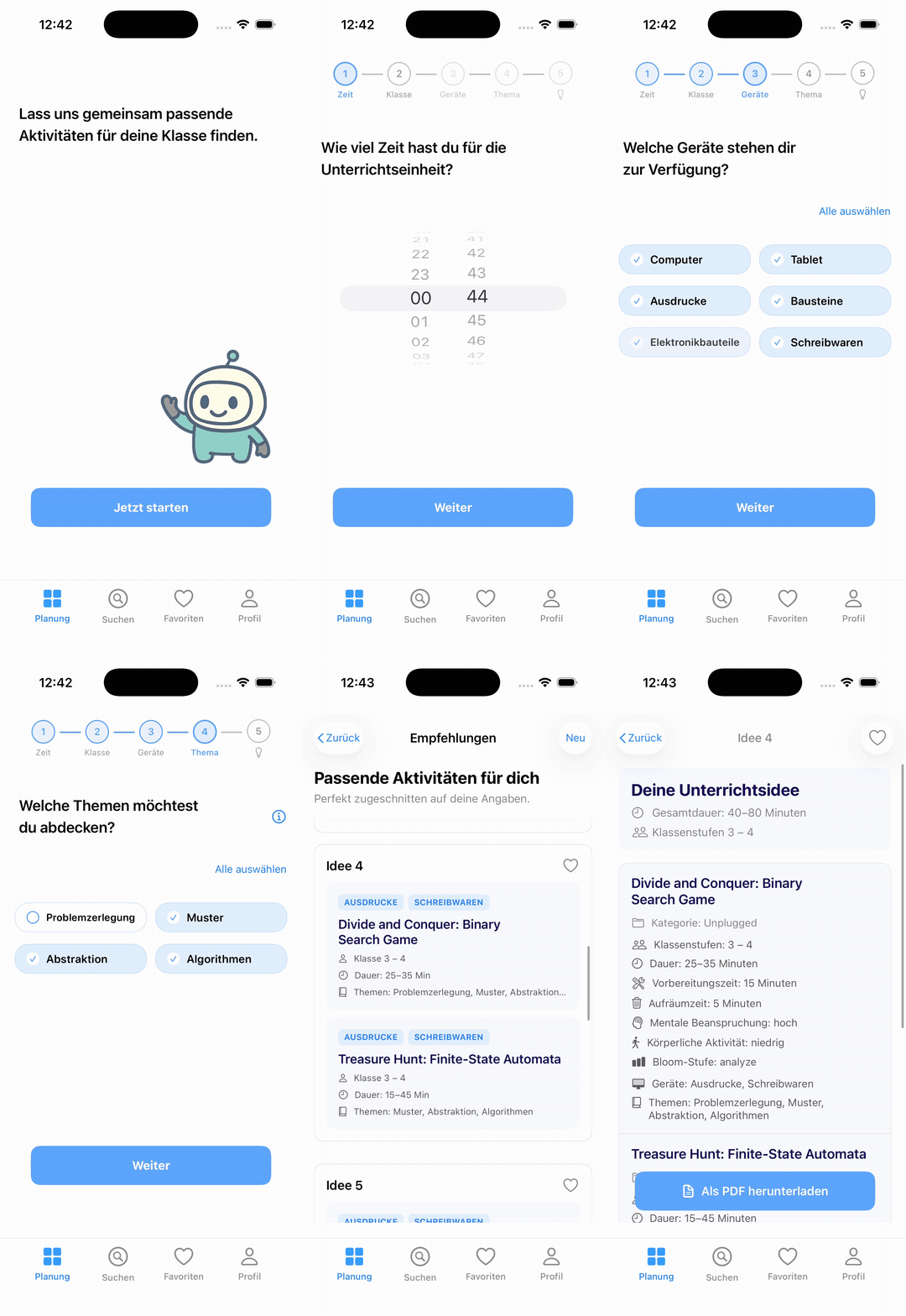
Animation of the complete activity recommendation workflow.