Activity Discovery
The Activity Discovery page allows teachers to explore pre-curated activities that can be integrated into regular lessons with minimal preparation.
Overview
- Displays activities as cards in a responsive grid layout.
- Shows key information at a glance: Title, Topic, Grade, Duration, and Required Materials.
- Offers search by title to quickly find specific activities.
- Provides filter options by grade, topic, duration, and available materials.
- Allows direct access to activity details.
Steps for Browsing Activities
- Open the LEARNApp Search tab in the navigation bar.
- Use the search bar to look for keywords (e.g. "patterns", "binary", "logic")
- Apply filters for grade, duration, topic, and device availability.
💡 Tips: Start with broader filters to explore a wide range of activities.
- Tap any activity card to open the detailed activity view and access all related information.
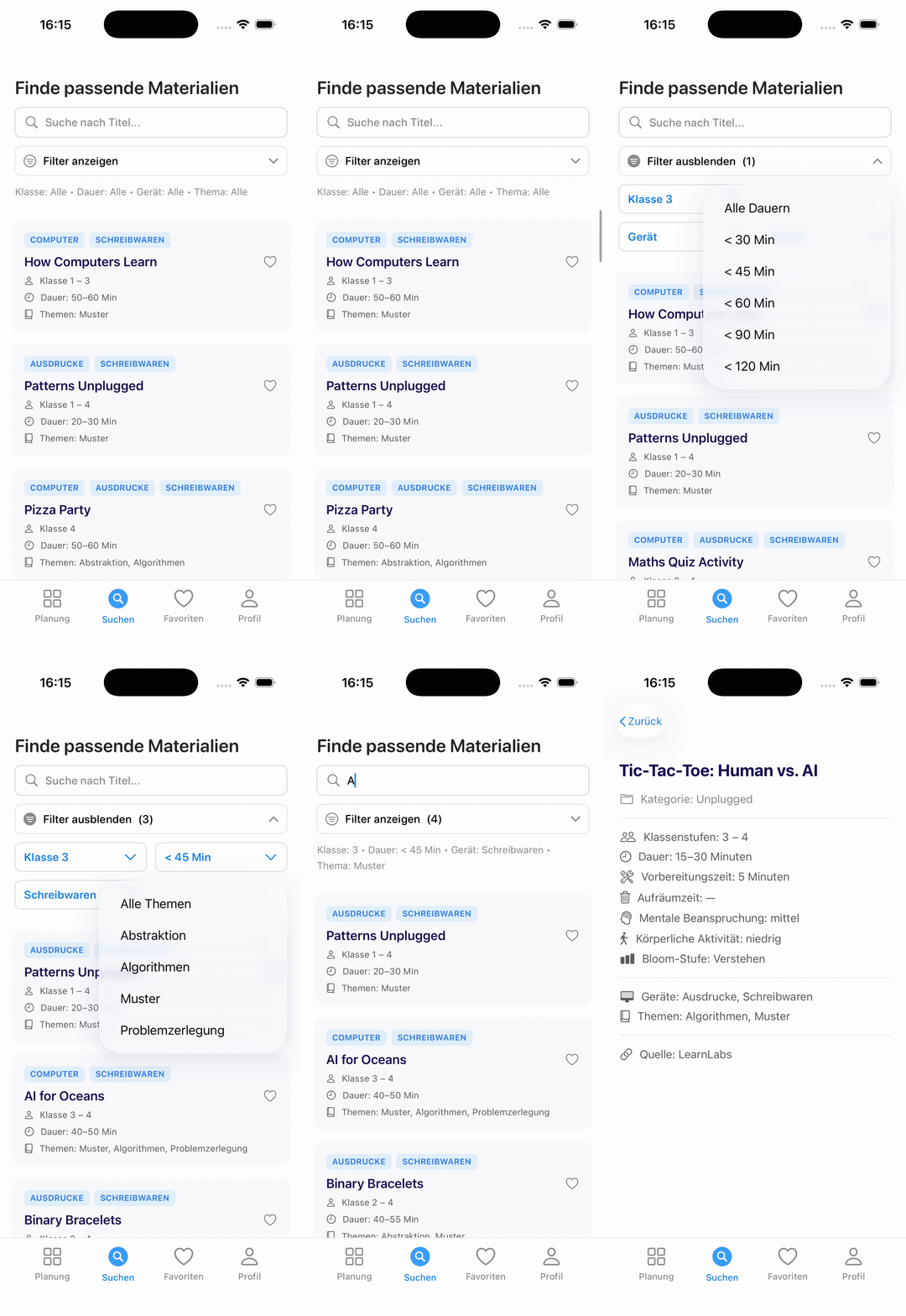
Animation of browsing activities with applied filters (grade: Klasse 3, duration: < 45 min, topic: Muster, materials: Schreibwaren) and keyword search “AI”.
Detailed Activity Information
The Activity Detail View provides in-depth information to help teachers prepare and assess the suitability of each activity.
Each activity includes the following fields:
| Field | Description |
|---|---|
| Preparation Time | Estimated preparation time before the activity. |
| Cleanup Time | Estimated cleanup time after the activity. |
| Mental Effort | Level of mental effort required from students. |
| Bloom Level | Corresponding cognitive level based on Bloom’s taxonomy. |
| Physical Activity | Degree of physical movement or activity involved. |
| Required Materials | List of required tools or devices. |
| Category | Indicates the general type of activity, e.g. Hybrid, Unplugged, or Digital. |
| Topic | The main subject area of the activity, such as Algorithms, Patterns, Data, or Logic. |
| Source | The original source of the activity material (e.g., Code.org, CS Unplugged, TeachComputing.org). |
These details allow teachers to quickly evaluate whether an activity fits their available time, resources, and learning objectives.