Architecture and terminology
This page is the source of truth for the terms in all Logos documentation. It defines the subsystem decomposition. Every other document uses these names. Read this page first if the documentation is not clear. For diagrams of the system, see System Design. The diagrams show the top-level design, the deployment, the data model, and the request flow.
Logos is an LLM engineering platform. A client calls Logos like an OpenAI
endpoint (/v1/chat/completions, /v1/models, …). Logos sends the request to
one of two kinds of backend: a cloud provider or a self-hosted GPU worker.
Logos does logging, billing, policy checks, and scheduling between the client
and the backend.
The subsystem decomposition
Logos has two kinds of machine and one optional add-on:
- A core node is one machine that runs the core stack below. Clients connect only to this machine.
- A worker node is a separate GPU machine that serves local models and connects out to the core node. Logos can have any number of worker nodes.
- The optional agent stack is a set of services on the core node. These services run coding agents on spare serving capacity.
Core stack (one machine)
| Subsystem | Directory | What it is |
|---|---|---|
| Web service | logos-webservice/ | Spring Boot service for identity (users, teams, roles), billing, statistics, and admin endpoints (/api/*). It also owns the public inference gateway (/v1, /openai, /jobs). The gateway does Logos API-key authentication and approximate budget checks. It sends pure-cloud named-model traffic directly to the cloud provider. It sends local and mixed traffic through a reverse proxy to the orchestrator. Deploy more than one replica. Traefik balances the load between the replicas. Schema migrations use the Liquibase database lock, so concurrent starts are safe. |
| Orchestrator | logos-orchestrator/ | FastAPI service (single instance). It classifies and schedules local (logosnode) and mixed requests. It holds the registry of connected worker nodes. It sends each request to the chosen provider. In the default gateway path, pure-cloud named-model traffic does not enter the orchestrator. |
| UI | logos-ui/ | The Angular admin frontend. The same Traefik instance that serves the API also serves the UI. |
| Database | db/ | PostgreSQL 17 plus pg_cron. The Liquibase changelogs of the web service are the source of truth for the schema. |
| Keycloak | keycloak/ | The OpenID Connect provider for login. The development stack includes its own Keycloak. A production deployment uses the existing identity provider of the organisation. |
| Traefik | (compose file) | The reverse proxy in front of all other services. It does TLS (Let's Encrypt in production) and path-based routing, which puts the UI and the API on one domain. Inference paths (/v1, /openai, /jobs) and admin API paths go to the web service. Worker control routes that need the live registry stay on the orchestrator. |
| Rate-limit gateway | rate-limit-gateway/ | An nginx front door in front of Traefik. It enforces request budgets for each IP address. This is the first layer of the two-layer rate limiting (per IP address here, per service in Traefik; see deployment). |
Worker node (separate machine)
| Subsystem | Directory | What it is |
|---|---|---|
| Worker node | logos-workernode/ | The outbound worker for local inference. It runs one lane (a vllm serve process) for each configured model. It keeps a WebSocket session open to the orchestrator. It reports the runtime state, so that the orchestrator can schedule against warm and cold capacity. It also calibrates the model memory profiles automatically. |
| Node manager | logos-node-manager/ | An optional service on a worker host. It replaces the worker container with a new image and checks the new container. If the new container does not become healthy, it starts the previous version again. |
Agent stack (optional, core node)
| Subsystem | Directory | What it is |
|---|---|---|
| Agent runner | logos-agent/ | Runs coding agents in isolated containers with a resource cap. The containers use serving capacity that Logos does not use for other work. The agent runner releases this capacity when a user needs it. |
| Agent gateway | agent-gateway/ | An nginx bridge. It gives the agent session containers access to only the /v1 model surface of the orchestrator. The model credential is in the agent gateway. |
These internal engineering references are optional. You do not need them to use Logos: the request pipeline reference, the agent runner README, and the worker node guide.
How the pieces talk
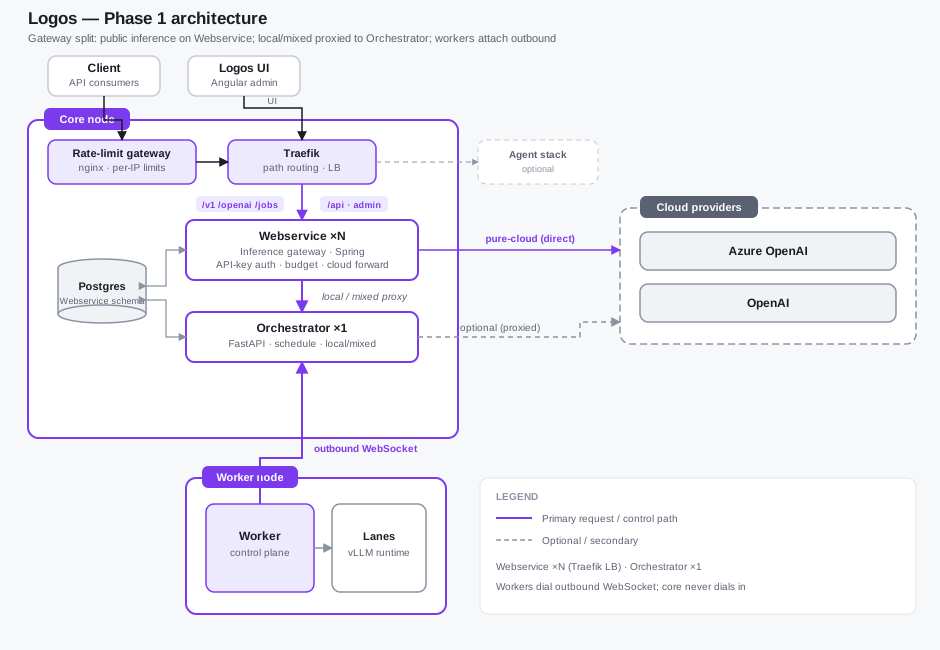
The structural diagrams (top-level, deployment, data model, inference paths) are on System Design. The diagram below shows the same information about the gateway split in one picture:
Editable source: architecture.drawio (open it in diagrams.net).
This design has three properties:
- The worker is outbound-only. It opens the WebSocket to the orchestrator. It does not need an inbound port, so a worker behind a NAT or a firewall works without a change. All control messages (sleep, wake, calibrate, lane changes) use this connection.
- The client sees one domain. Traefik routes by path on the default HTTPS
port. Public inference (
/v1,/openai,/jobs) and admin API (/api, …) go to the web service. A small set of logosnode control routes need the live worker registry, so they stay on the orchestrator. The UI serves all other paths. - Cloud and local split (Phase 1). The web service authenticates a
pure-cloud named-model request. Then it sends the request directly to the
configured cloud provider. The web service also authenticates local and mixed
traffic. Then it sends this traffic through a proxy to the orchestrator.
To scale the web service, set
LOGOS_WEBSERVICE_REPLICASin the.envfile of the core node (see deployment). Keep a single orchestrator instance.
Glossary
| Term | Meaning |
|---|---|
| Core node | The machine that runs the core stack. The clients, the UI, and all admin functions connect to this machine. |
| Worker node | A machine (usually with a GPU) that runs the worker node service. It serves local models and connects out to a core node. |
| Lane | One vllm serve process on a worker. It serves one model. The orchestrator schedules lanes. The capacity planner puts lanes to sleep and wakes them. |
| Model | A model id that Logos offers to clients, for example logos-v1/.... A cloud provider or a worker lane serves the model. |
| Provider | The place where a model runs. It is a cloud provider (Azure, OpenAI, …) configured on the core node, or a connected worker node. The Providers page of the UI lists both kinds. |
| Policy | A rule that limits the models that a team or an API key can use. Use the Policies page of the UI to manage policies. |
| Team | A group of users. API keys and budgets belong to teams. The policies of a team apply to the API keys of the team. |
| API key | A secret that a client uses to call the Logos API. An API key belongs to a team and has the model permissions of the team. An API key can have a fixed queue priority. |
| Inference gateway | The web service path that ends /v1, /openai, and /jobs. It does authentication and budget checks. Then it sends the request directly to the cloud or through a proxy to the orchestrator. |
| Batch | An OpenAI Batch API job (/v1/batches). It is many requests in one .jsonl upload. These requests can wait for the result. See batch processing. |
| Agent session | One run of a coding agent in an isolated container. The agent runner starts the run from a task (usually a GitHub issue or pull request). |
| Calibration | The measurement by the worker of the GPU memory that each model needs when it is loaded and when it sleeps. The capacity planner uses the profiles. |
| Capacity planner | The background loop of the orchestrator. It puts idle lanes to sleep (by default after 30 minutes without a request), wakes lanes on demand, and adjusts the GPU memory utilization. It does not sleep or unload a locked lane. |
| Lane lock | A mark that a Logos admin sets on a lane on the statistics page. The capacity planner keeps a locked lane warm: it does not put the lane to sleep, and it does not unload the lane for other models. After a worker restart, it loads the lane again on the same GPUs. The lock is stored in the lane_locks table. |
| Worker lock | A lock on a whole worker (lane id * in lane_locks). The capacity planner does not load, wake, put to sleep or unload a lane there on its own, and it puts every lane back after a worker restart. Actions of a Logos admin still run. |
Roles
Logos has three roles. The role of a user decides which UI pages the user sees and which admin endpoints the web service accepts:
| Role | UI label | Scope | Guide |
|---|---|---|---|
logos_admin | Logos Admin | Full platform access to all pages, including providers, policies, billing, and agent sessions. | Logos Admin |
app_admin | App Admin | Application administration: users, teams, and the shared developer pages. | App Admin |
app_developer | App Developer | Developer tools: models, own workspace, AI tools. | App Developer |
Logos derives the role of a user at login from the roles of the identity
provider account. An account with the configured logos_admin role becomes a
Logos Admin. An account with the configured app_admin role becomes an App
Admin. Every other authenticated user is an App Developer. You configure the
mapping for each deployment (see the
installation guide).