System Design
This page is the structural overview of Logos. It shows how the parts fit together, how a typical deployment looks, what the core data model is, and how an inference request moves through the stack. The Architecture glossary defines the terms on this page.
The diagrams are SVG exports. The editable sources are in system-design.drawio (open it in diagrams.net; each diagram has its own page).
Top-Level Design
Logos has three main parts. The first part is the application client (the Angular Logos UI in the browser). The second part is the API clients (OpenAI-compatible SDKs and scripts). The third part is the application server on the core node. The server has two services. The Spring Boot Webservice does identity, billing, the admin API, and the public inference gateway. The FastAPI Orchestrator does local and mixed scheduling and holds the worker registry.
UI authentication uses an external user management system (Keycloak or the IdP of the organisation). Inference clients authenticate with API keys. Self-hosted models run on separate worker nodes. Configured cloud providers serve the cloud models.
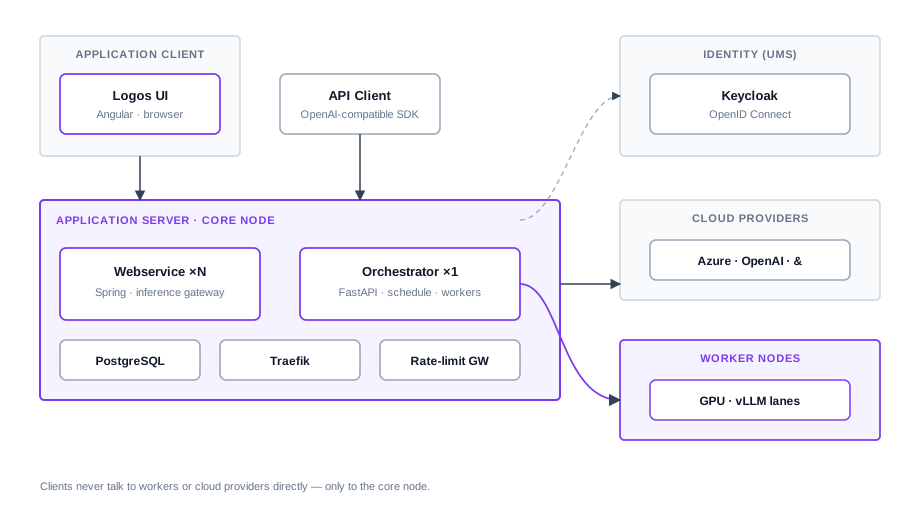
Editable source: system-design.drawio (page Top-Level).
Deployment
A typical deployment has the entire core stack on one core node. It has zero or more worker nodes on GPU machines. The diagram uses the same «device» style as the Artemis documentation. The clients are on the left, the main server is in the center, and the specialized workers are on the right.
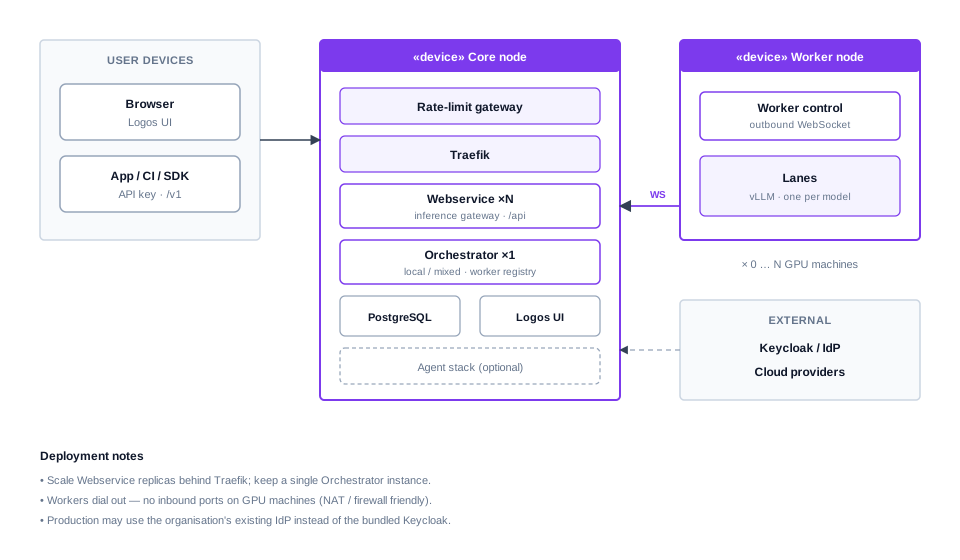
- Webservice ×N — Traefik balances the load between the replicas. It is safe to scale the Webservice for traffic with many cloud requests. Liquibase takes a DB lock when it migrates.
- Orchestrator ×1 — it holds the live worker registry and schedules local and mixed work. Keep a single instance.
- Worker nodes open an outbound WebSocket to the orchestrator. The core does not connect into a worker. Thus NAT and locked-down GPU networks work without inbound ports.
- In production, you can replace the bundled Keycloak with the existing IdP of the organisation (see installation).
The deployment page gives the operational details (compose files, env vars, TLS).
Data Model
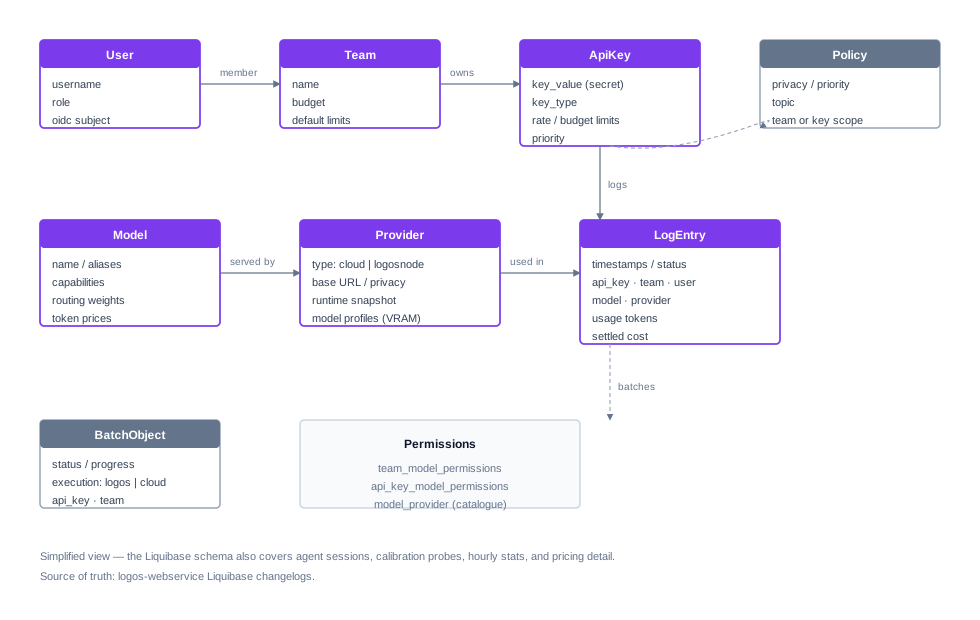
The Webservice owns the PostgreSQL schema (Liquibase). The diagram below is a simplified view of the entities that the role guides and the API clients use.
:::info Simplified on purpose
The real schema also covers agent sessions, calibration probes, hourly
statistics, batch line results, and pricing rows. For the exact columns, use
the Liquibase changelogs under logos-webservice.
:::
Read the diagram from left to right:
- A User belongs to one or more Teams (membership).
- An ApiKey belongs to a team (and often to a user). It has rate limits, budget limits, and a queue priority.
- Logos offers Models to clients. A Provider is the place where a model
runs (
cloudorlogosnode). - The team-level and key-level permissions decide which models a caller can use. Policies also limit privacy, priority, and topic.
- Each inference attempt creates a LogEntry (usage tokens and settled cost). BatchObject rows track OpenAI-compatible batch jobs.
Inference Request Flow
All public inference enters the inference gateway on the Webservice
(/v1, /openai, /jobs). The gateway does API-key authentication and budget
checks. Then the traffic goes on one of two paths:
| Path | When | What happens |
|---|---|---|
| A — Pure cloud | Named model with only cloud deployments | The Webservice sends the HTTP request directly to the cloud provider and logs the result. The Orchestrator does not take part. |
| B — Local / mixed | Local models, mixed routing, policies, jobs, listings, … | The Webservice sends the request through a proxy to the Orchestrator. The Orchestrator classifies and schedules the request and communicates with workers (and optionally with the cloud). |
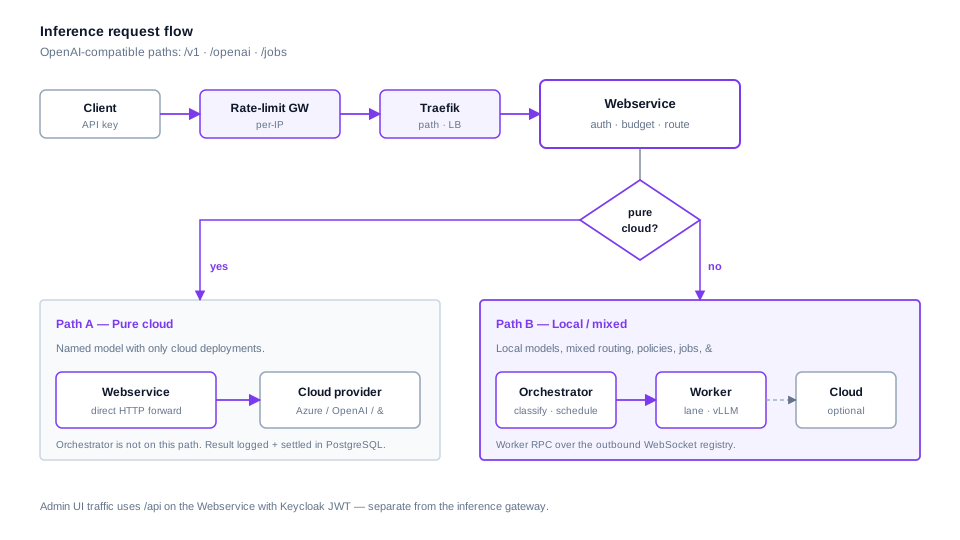
This design has two properties (the same as in the older architecture diagram):
- Workers are outbound-only. Control messages (sleep, wake, calibrate, lane changes) and inference RPC use the WebSocket that the worker opened.
- Clients see one domain. Traefik routes by path. Inference and
/apigo to the Webservice. A small set of worker-control routes need the live registry, so they stay on the Orchestrator. The UI serves all other paths.
To scale the cloud capacity, set LOGOS_WEBSERVICE_REPLICAS on the core node
(deployment — inference gateway replicas).
Related reading
| Topic | Document |
|---|---|
| Glossary, roles, subsystem directories | Architecture |
| Install / compose / TLS / rate limits | Deployment · Installation |
| GPU machines | Worker Nodes |
| OpenAI Batch API | Batch Processing |
| Request pipeline (orchestrator internals) | logos-orchestrator pipeline README |