Recommendation Letters
Some doctoral positions require one or more letters of recommendation. On DocApply you nominate your recommenders, and they submit their recommendation directly through a secure link, so you do not need to collect or forward any documents yourself. This page explains how to add recommenders, keep their submissions confidential, and monitor their progress.
The Recommendation Letters step appears only for positions that require recommendations. The professor decides, per position, how many recommendations are required and whether recommenders provide a letter, a structured evaluation, or both.
✍️ Adding Your Recommenders
The Recommendation Letters step is part of the application form. For each recommender, enter their details and select Add.
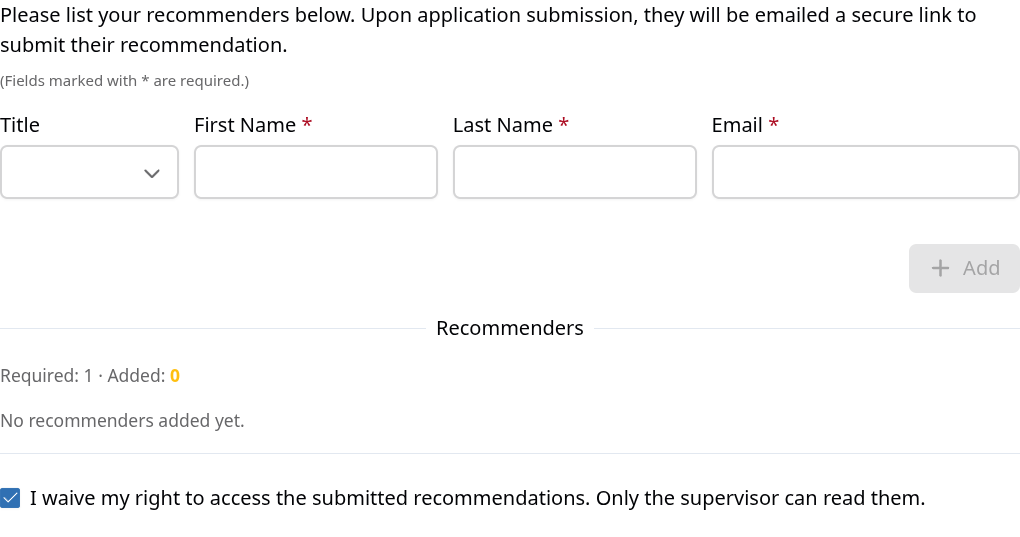
For each recommender, provide:
- Title — optional (for example, Prof. Dr., Prof., or Dr.)
- First Name — required
- Last Name — required
- Email — required, and used to send the secure invitation link
Below the form, the Recommenders section shows Required (how many recommendations the position needs) next to Added (how many you have added so far), so you can see your progress at any time.
Invitation emails are sent when you submit your application — not when you add a recommender. Until submission, your recommenders are saved but not yet contacted.
🔒 Keeping Recommendations Confidential
At the bottom of the step you will find the option:
I waive my right to access the submitted recommendations. Only the supervisor can read them.
- This option is selected by default.
- When selected (confidential), only the supervising professor can read the submitted recommendations. You will still see who you asked and whether they have submitted, but not the content.
- When cleared, you will also be able to view the submitted recommendations once they arrive.
The setting applies to the whole application — that is, to all of your recommenders — rather than to each recommender individually.
Many recommenders expect their assessment to remain confidential and may provide more candid feedback when it is. Keeping the waiver selected is common practice.
📊 Tracking Status
Each recommender in the list shows a status, so you can see the current state of each request:
- Requested — the invitation has been sent and the recommender has not responded yet.
- Submitted — the recommendation has been received.
- Declined — the recommender chose not to provide a recommendation.
- Expired — the deadline passed before the recommender submitted.
🛠️ Managing Recommenders After You Apply
You can add, edit, or remove recommenders even after submitting your application, from your application's detail page.
A few conditions apply:
- Changes are possible only while a request is still pending (Requested) and while the application is still active and the deadline has not passed.
- Once a recommender has Submitted, Declined, or the request has Expired, that entry can no longer be edited or removed.
- Editing a recommender's email address sends a new invitation to the updated address.
📨 What Your Recommenders Will Do
Your recommenders do not need a DocApply account. Each receives an email with a secure link and completes the request there:
- The page shows who the request is for — your name, the position, and the research group — and whether the recommendation is confidential.
- Depending on the position, they will upload a recommendation letter (PDF), complete a short structured evaluation (their relationship to you, an assessment of you compared with peers, and an overall recommendation), or both.
- They can also decline the request.
- The link remains valid until the position's deadline (max. two months), and reminder emails are sent automatically as the deadline approaches.
🚪 Withdrawing Your Application
If you withdraw your application, you receive a confirmation email and the application is marked as Withdrawn. Recommendations that have already been submitted are unaffected.
Recommenders whose requests are still pending are notified by email that their recommendation is no longer needed, so that no open request remains for an application you have withdrawn.
Because invitations are sent when you submit and recommenders may need time to respond, please add your recommenders and submit your application well before the deadline.