Artemis Intelligence
Artemis Intelligence is the collection of AI-assisted capabilities layered on top of Artemis. It blends in-process modules (Hyperion, Atlas, Communication) with external EduTelligence services (Iris, Athena, Nebula, AtlasML) and a forthcoming AI gateway (Logos) that will unify routing, metering, and privacy controls.
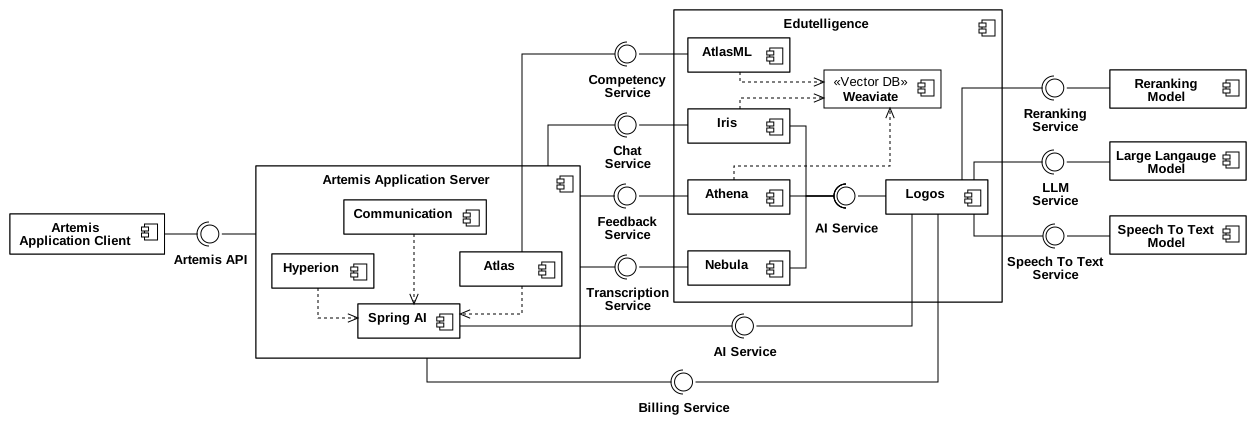
Figure 1 - Artemis Intelligence subsystems and data flows (updated Dec 1, 2025).
What lives where
| Subsystem | Scope & runtime | Current state (Dec 1, 2025) |
|---|---|---|
| Hyperion | Spring AI inside Artemis server, AI-assisted programming exercise authoring | Live — configurable via Spring AI; see Hyperion Setup |
| Atlas | Spring AI inside Artemis server, competency-based learning (learner profiles, recommendations) | Live (server) — Spring AI wired for Atlas agents; AtlasML will be connected soon |
| Communication | Artemis server, orchestrates FAQ rewrite/consistency pipeline | Live — orchestration in Artemis; execution still hits Pyris; target is to migrate it to Spring AI |
| Iris (Pyris) | EduTelligence intelligent tutoring service (Python/FastAPI) | Live — production service powering tutor chat; runs in edutelligence/iris (aka Pyris) |
| Athena | EduTelligence feedback service (Python/FastAPI) | Live — production service powering AI feedback generation |
| Nebula | EduTelligence transcription service (Python/FastAPI) | Live for transcription — Artemis |
| AtlasML | EduTelligence competency graph | Available service; not yet connected from Artemis — Atlas Java module has REST client and feature flag but awaits activation/config |
| Logos | AI gateway for routing, metering, privacy tiers | Implemented (edutelligence/logos) but not integrated with Artemis yet |
Activation: Artemis-side Spring AI modules (Hyperion & Atlas)
-
Enable module features
- Hyperion:
artemis.hyperion.enabled=true(defaults tofalse). - Atlas:
artemis.atlas.enabled=true(defaults totrueinapplication-core.yml). Both flags participate inSpringAIAutoConfigurationFilter, so at least one must be true for Spring AI autoconfiguration to load.
- Hyperion:
-
Choose exactly one Spring AI provider (OpenAI or Azure OpenAI are pre-bundled). Example (OpenAI-compatible):
spring:
  ai:
    azure:
      openai:
        open-ai-api-key: <openai-api-key> # sets endpoint to https://api.openai.com/v1
        chat:
          options:
            deployment-name: gpt-5-mini
            temperature: 1.0
For local testing with LM Studio or Ollama, follow the Spring AI Development Guide.
EduTelligence services
- Iris (Chat Service) — primary chat orchestrator, handles retrieval-augmented prompts and session memory.
- Athena (Feedback Service) — generates exercise feedback.
- Nebula (Transcription Service) — speech-to-text; used for lecture media pipelines.
- AtlasML (Competency Service) — suggests and manages competency graphs. Use
atlas.atlasml.base-urlto point Artemis to the deployed AtlasML instance.
When these services are reachable, Artemis calls them via the AI Service interfaces shown in the diagram. Add the EduTelligence health endpoints to monitoring so failures short-circuit rather than degrade user flows.
Logos (AI gateway) — what to expect
- Unified routing for AI services such as LLMs, reranking, and Speech-To-Text. Provider-agnostic, supports local and private-cloud LLMs.
- Metering and billing hooks for Artemis. Request IDs passed through Spring AI.
- Privacy tiers enforced per course/tenant (local-only, private-cloud, or disabled).
- Central policy plane for rate limits, redaction, and prompt logging reused by Iris/Athena/Hyperion/Atlas.
- Acts purely as a proxy: Spring AI (Artemis) and EduTelligence services keep their clients; only the configured endpoint/credentials switch from the upstream model provider to Logos.
Operational notes you actually need
- Feature flags:
artemis.hyperion.enabled(default false) andartemis.atlas.enabled(default true). If both are false,SpringAIAutoConfigurationFilterblocks all Spring AI autoconfig. - AtlasML wiring exists in Java (
AtlasMLService, feature flagFeature.AtlasML) but needs a live base URL plus feature flag to be actionable.
EduTelligence setup references
- Suite overview and service setup: EduTelligence README
- Iris/Pyris service setup: edutelligence/iris
- Athena service setup: edutelligence/athena
- Nebula services: edutelligence/nebula
- Logos gateway: edutelligence/logos