AI Writing & Translation
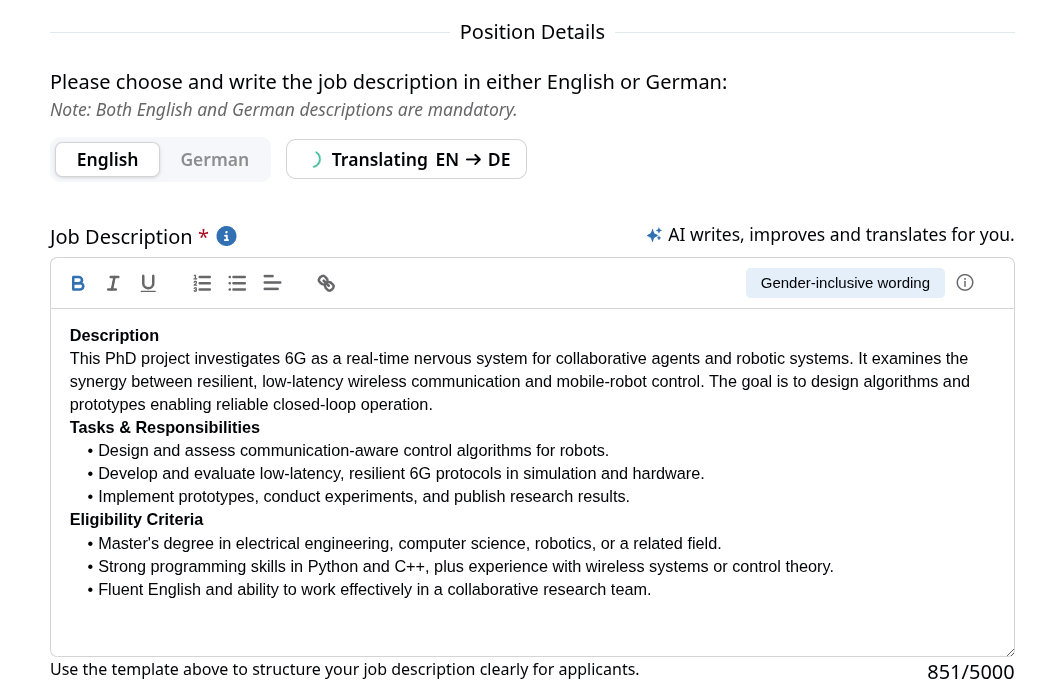
Every doctoral position on DocApply is published in both English and German, allowing applicants to read the description in their preferred language. To support this, the Position Details step of the Job Creation Form provides an AI assistant that writes, improves, and translates the job description.
The description is written once in the language of your choice, and the assistant produces the second language version, removing the need to translate the text manually.
A position can only be published once both the English and the German description have been provided.
📝 The Position Details Editor
✨ What the AI Assistant Can Do
Write or rewrite the description
Use the AI assistant to draft a description from the details you have already entered (such as title, research area, and location) or to polish text you have started yourself:
- Write with DocApply generates a first draft of the description in the currently selected language.
- Rewrite with DocApply improves and restructures the text you already have.
The text streams into the editor as it is generated. When it is finished, you can edit it freely.
The AI works best when you have already filled in the basic position details (title, research area, field of studies, location) — it uses them as context to produce a more relevant draft.
Automatic translation between English and German
You only write the description once. Whenever you finish writing or editing one language version, the assistant automatically translates it into the other language in the background.
- The translation appears in the other language tab — switch the language toggle to review it.
- If you keep editing the source text, the assistant restarts the translation with your latest version, so the two language versions stay in sync.
The translation is a starting point, not a final proofread. Always switch to the other language and review the result before publishing — check terminology, tone, and any field-specific wording.
Compliance and inclusive-language checks
Use the sidebar to check your description for legal, transparency, public-sector, data-minimization, and inclusive-language concerns. You can find the results grouped by category in the Compliance Checker, while the relevant passages are highlighted in the editor.
Select a category to show only its highlights. Hover over a highlighted passage to review the suggestion. You can then replace text, remove text, or add a proposed clarification, depending on the finding.
When you accept a suggestion, DocApply:
- applies the change to the description;
- applies the corresponding change to the other language when available;
- removes the resolved finding from both language versions; and
- updates the quality score without starting another analysis or translation.
If you dismiss a highlight, it disappears from the editor but continues to count toward your quality score until you correct the underlying text.
You may see different highlighted wording in English and German, but both highlights represent the same finding. When you resolve it in either language, DocApply resolves it in both to give you a seamless experience.
The checker is intended as an assistive tool and may not always provide complete or fully accurate results. Always verify suggested wording and applicable legal requirements before publishing.
Automatic and manual analysis
When you apply a Compliance Checker action, DocApply saves your edited text and resolved finding directly, then recalculates your score from the remaining findings.
Use the reload icon next to Compliance Checker if you want to check the current text again. DocApply then:
- saves the current description;
- checks the selected language again; and
- updates the corresponding findings in the other language.
Your description is not translated again, and the other language is not checked a second time. While the check is running, the reload icon changes to an X. Select the X if you want to cancel it.
You can review a finding in either description when DocApply identifies the corresponding wording. Text that stays the same in both languages, such as URLs, abbreviations, or proper names, is recognized as well. If no clear corresponding passage can be identified, you will see the highlight only in the language where the finding was detected.
Quality score
Your quality score combines the inclusive-language score with the legal compliance score. If you see the same finding in both languages, it is counted only once.
- AGG and data-minimization (DSGVO) findings are veto findings and set the legal score to zero while they remain unresolved.
- Transparency and public-sector findings reduce the legal score progressively. For example, three transparency findings reduce the legal compliance component from 100 to about 61.
- Resolving a finding recalculates the score immediately from the remaining findings; a new AI analysis is not required.
The score serves as guidance when reviewing your job description. A higher score generally indicates that more of the recommended criteria are covered. The checker can help identify gaps that general TUM data protection guidelines may not address for every individual job posting. However, always verify suggested wording and applicable legal requirements before publishing.
🔀 Turning the AI Assistant On or Off
The AI assistant is optional. You can enable or disable it from the toggle in the editor header, and the info icon next to it explains what each mode does:
- AI enabled: The assistant helps you draft the description, and the translation into the second language is generated automatically.
- AI disabled: The assistant is not available, and you must write and translate both language versions manually.
⚙️ Step-by-Step: Creating a Bilingual Description
Goal: Produce a complete English and German job description ready for publication.
- Open the Job Creation Form and go to the Position Details step (see Create Job).
- Choose the language you want to write in using the English / German toggle.
- Write the description yourself, or click Write with DocApply to generate a draft and Rewrite with DocApply to improve it.
- Wait for the Translating indicator to finish — the assistant translates your text into the other language automatically.
- Switch the language toggle to the other language and review the translation for accuracy, terminology, and tone. Edit it directly if needed.
- Make sure both language versions are complete and within the character limit.
- Continue through the remaining steps and publish the position.