Blocking File System Access (AOP)
This page follows one paper being picked up, the whole way through.
The pupil reaches for it, the teacher gets there first, looks at which paper it is and what is about to be done with it, checks that against the permitted list, and then either allows it or takes it away. Every step of that is written down here.
1. Ares 2 AOP File System Access Control: High-Level Overview
This document explains how Ares 2 decides whether student code may access the file system through a set of monitored file system methods. It checks:
- The caller of the monitored file system method
- The operations the monitored file system method wants to conduct
- The paths the monitored file system method wants to access
Summary for Programming Instructors (TL;DR)
What does Ares do?
- ✅ Monitors a broad set of file system APIs automatically (Read, Write, Create, Delete, Execute)
- ✅ Blocks student code from accessing forbidden paths
- ✅ Configurable via YAML - You determine which paths are allowed
- ✅ Works without code changes to student code (via AOP)
- ✅ Provides clear error messages with exact source (which method, which path, which test)
When do you need this?
- When students should practice file operations (e.g., reading/writing files)
- But you want to prevent them from reading sensitive files or deleting system files
- Example: Allow
/tmpfor exercises, block/etcand/home
How does it work (simplified)?
- Student calls
Files.readString("/etc/passwd") - Ares intercepts the call (AOP) and checks:
- Does this come from student code? ✓ Yes
- Is
/etc/passwdin the allowlist? ✗ No
- Ares blocks and throws a meaningful exception
Comparison: AOP vs. Architecture
| Aspect | Aspect-oriented programming (AOP), through Byte Buddy or AspectJ | Architecture (ArchUnit, or the T. J. Watson Libraries for Analysis, WALA) |
|---|---|---|
| Analysis Time | During execution (runtime) | Before execution (static) |
| Detection | Intercepts method calls | Analyses code structure |
| Granularity | Path-based permissions | Binary (allowed/forbidden) |
| Performance Impact | Runtime overhead on every call | Analysis overhead only |
| False Positives | None (only executed code checked) | Possible (unreachable code) |
| Coverage | Only executed paths | All code paths |
| Configuration | Path-level permissions | Class-level exemptions; package permissions only affect the separate import rule |
| Use Case | Runtime security enforcement | Pre-submission validation |
| Error Timing | Production execution | Test phase |
1.1 How Does The UML Activity Diagram look like?
Below is a general overview of the process for deciding whether to allow or block file access as a Unified Modeling Language (UML) activity diagram. Throughout this document, you will find the following symbols:
- 🔴 Red = File access blocked (security policy violation detected)
- 🌕 Yellow = Intermediate condition met → continue to the next verification step
- 🟢 Green = File access permitted (no security policy violation detected)
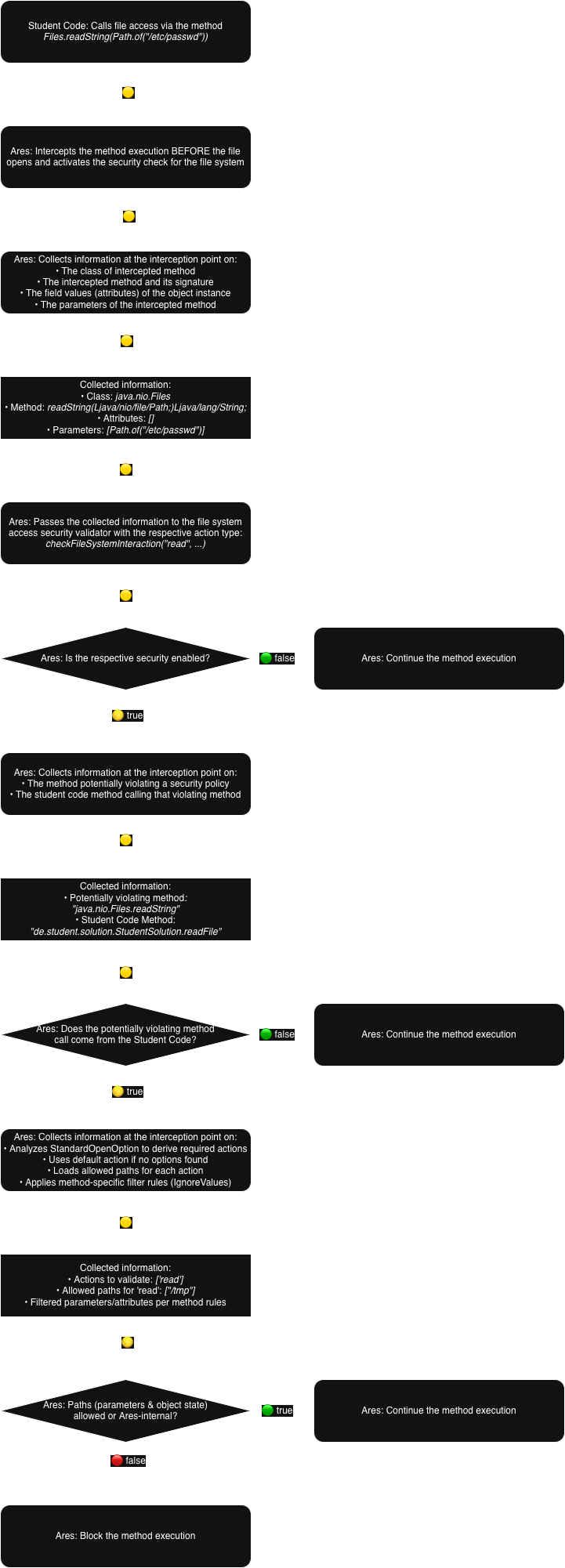
1.2 What Is AOP?
AOP (Aspect-Oriented Programming) is a technique that automatically runs security checks before certain methods execute, without modifying the student code. Think of it like a security guard checking IDs before people enter a building - the building code does not change, but everyone gets checked automatically when interacting with the building.
Concrete Example:
Without AOP: You would have to manually write security checks before every file access (if that is even possible).
public void readFile(String path) {
    if (!isAllowed(path)) throw new SecurityException(); // Security check happens manually and has to be stated explicitly!
    Files.readString(Path.of(path));  // Actual code
}
With AOP: Ares automatically inserts this check before EVERY Files.readString(), so no code changes are required.
public void readFile(String path) {
    Files.readString(Path.of(path));  // Actual code, Security check happens automatically in the background!
}
1.3 Which AOP Modes / Implementations Are There?
Ares automatically monitors file system operations by intercepting specific Java methods using one of two AOP implementations:
- Byte Buddy (Instrumentation Mode): Automatically adds security checks when Java loads classes (called bytecode manipulation).
- AspectJ (AspectJ Mode): Automatically adds security checks in a second compilation step (called weaving).
Both implementations set up "checkpoints" that activate before the file operation happens, giving Ares a chance to verify whether the operation should be allowed or blocked. The validation logic is identical in both modes, but interception coverage differs slightly (AspectJ uses explicit pointcuts; instrumentation uses type-hierarchy maps).
1.4 What Are The Internal Configuration Settings?
Instructors define file system access policies in a policy file, and Ares 2 translates them into the following runtime settings (allowlists are folder prefixes; only paths below them are permitted):
| Setting | Type | Description | Example |
|---|---|---|---|
| aopMode | String | The used AOP implementation | "INSTRUMENTATION" (Byte Buddy) or "ASPECTJ" |
| restrictedPackage | String | The package containing the student code (the code to be monitored) | "de.student." |
| allowedListedClasses | String[] | The list of classes (usually test classes) that are exempt from supervision | ["de.student.util.Helper"] |
| pathsAllowedToBeRead | String[] | The list of folders that the student code can read files from | ["/tmp", "/home/student/input"] |
| pathsAllowedToBeOverwritten | String[] | The list of folders that the student code can write files to | ["/tmp", "/home/student/input"] |
| pathsAllowedToBeCreated | String[] | The list of folders that the student code can create files in | ["/tmp", "/home/student/input"] |
| pathsAllowedToBeExecuted | String[] | The list of folders that the student code can execute files in | ["/tmp", "/home/student/input"] |
| pathsAllowedToBeDeleted | String[] | The list of folders that the student code can delete files in | ["/tmp", "/home/student/input"] |
1.5 When Is File Access Generally Blocked?
Access is BLOCKED 🔴 if ALL of the following conditions apply:
- Security enabled:
aopModeis set to"INSTRUMENTATION"or"ASPECTJ" - Student code detected: The call stack contains classes in
restrictedPackageand not inallowedListedClasses - Derived actions: The actions are derived from the intercepted method and any
StandardOpenOptionvalues (may include multiple actions) - Path violation found: After method-specific parameter filtering, at least one extracted path (from parameters or attributes) does not match the list of allowed paths for its allowed actions
- Not exempt infrastructure access: The violating path is not an internal configuration/resource file of Ares and does not fall under one of the JVM-infrastructure exemptions (class-loading
.classreads, system JAR reads, JDK-internal reads, native-library loads, archive entry reads, root/). These exemptions apply at all check sites (parameters, receiver, and attributes).
Plain-language summary: if student code triggers a monitored file method and the path is outside the allowlist for the needed action, Ares blocks the access.
Access is ALLOWED 🟢 if ANY of the aforementioned conditions do not apply
In summary, Ares trusts code when:
- It is located outside of the
restrictedPackage - It is located inside of the
restrictedPackage, but its classes are listed inallowedListedClasseswithin the student package - It is listed as Ares internal code
Security Assumptions:
- Student code cannot modify Ares security settings (guaranteed by making settings private; reflection is disabled for student code)
- Student code cannot interfere with security monitoring (guaranteed by making settings private; reflection is disabled for student code)
- Student code executes after Ares is initialised (guaranteed by build pipeline)
2. Ares 2 AOP File System Access Control: Monitored File System Methods
2.1 Which Operations Does Ares 2 AOP File System Access Control Monitor?
Ares classifies file system interactions into five action types. These labels drive which allowlist is checked.
- READ: Accessing file contents or metadata without modifying them (streams, read APIs, attribute queries).
- OVERWRITE: Writing or mutating existing content/attributes (write/append/truncate, metadata setters).
- CREATE: Creating new files, directories, or links (create* APIs, file system creation/open).
- DELETE: Removing files or scheduling deletion/trash operations.
- EXECUTE: In Ares, 'Execute' is a broad category covering execution-like file actions such as loading native libraries and opening files or URIs in external applications (for example,
Runtime.load(...),System.loadLibrary(...), orDesktop.open(...)). Command execution APIs such asRuntime.exec(...)andProcessBuilder.start(...)belong to the Command System.
Some APIs can appear under multiple actions because they imply more than one permission (for example, copy/move or StandardOpenOption combinations).
2.2 What Are The Monitored READ Operations?
Security Component: Read operation monitor
Monitored APIs:
Read APIs listed below access file contents or metadata without modifying them.
Note on "Tested by RP" column: A ✅ means that this application programming interface (API) is the primary target of a dedicated test in the Reproducibility Package. For example, if a test uses
BufferedInputStreamto wrap aFileInputStream, only the wrapper (BufferedInputStream.<new>) is marked as ✅, not the underlyingFileInputStream.<new>which is merely a helper call in that context.
Reads any formatted file fully
| Class (fully qualified) | Method | Pointcut in AspectJ | Pointcut in Byte Buddy | Tested by RP |
|---|---|---|---|---|
| java.io.FileInputStream | <new> | ✅ | ✅ | ✅ |
| java.io.BufferedInputStream | <new> | ✅ | ✅ | ✅ |
| java.io.RandomAccessFile | <new> | ✅ | ✅ | ✅ |
| java.nio.channels.AsynchronousFileChannel | read | ✅ | ✅ | ❌ (triggers Thread security) |
| java.nio.channels.AsynchronousFileChannel | open | ✅ | ✅ | ❌ (triggers Thread security) |
| java.nio.channels.FileChannel | open | ✅ | ✅ | ✅ |
| java.nio.channels.FileChannel | map | ✅ | ✅ | ✅ |
| java.nio.file.Files | newByteChannel | ✅ | ✅ | ✅ |
| java.nio.file.Files | newInputStream | ✅ | ✅ | ✅ |
| java.nio.file.Files | readAllBytes | ✅ | ✅ | ✅ |
| java.lang.ClassLoader | getResourceAsStream | ✅ | ✅ | ❌ (triggers Reflection security) |
Reads UTF-8 text/tokens fully
| Class (fully qualified) | Method | Pointcut in AspectJ | Pointcut in Byte Buddy | Tested by RP |
|---|---|---|---|---|
| java.io.Reader | <new> | ✅ | ✅ | ✅ |
| java.nio.file.Files | newBufferedReader | ✅ | ✅ | ✅ |
| java.nio.file.Files | readString | ✅ | ✅ | ✅ |
| java.nio.file.Files | lines | ✅ | ✅ | ✅ |
| java.nio.file.Files | readAllLines | ✅ | ✅ | ✅ |
| java.util.Scanner | <new> | ✅ | ✅ | ✅ |
Reads only specifically formatted files fully
| Class (fully qualified) | Method | Pointcut in AspectJ | Pointcut in Byte Buddy | Tested by RP |
|---|---|---|---|---|
| java.io.DataInput | read | ✅ | ✅ | ❌ |
| java.io.DataInput | readBoolean | ✅ | ✅ | ❌ |
| java.io.DataInput | readByte | ✅ | ✅ | ❌ |
| java.io.DataInput | readChar | ✅ | ✅ | ❌ |
| java.io.DataInput | readDouble | ✅ | ✅ | ❌ |
| java.io.DataInput | readFloat | ✅ | ✅ | ❌ |
| java.io.DataInput | readFully | ✅ | ✅ | ❌ |
| java.io.DataInput | readInt | ✅ | ✅ | ❌ |
| java.io.DataInput | readLine | ✅ | ✅ | ❌ |
| java.io.DataInput | readLong | ✅ | ✅ | ❌ |
| java.io.DataInput | readShort | ✅ | ✅ | ❌ |
| java.io.DataInput | readUTF | ✅ | ✅ | ❌ |
| java.io.DataInput | readUnsignedByte | ✅ | ✅ | ❌ |
| java.io.DataInput | readUnsignedShort | ✅ | ✅ | ❌ |
| javax.imageio.ImageIO | createImageInputStream | ✅ | ✅ | ❌ |
| javax.imageio.ImageIO | read | ✅ | ✅ | ❌ |
| javax.sound.sampled.AudioSystem | getAudioInputStream | ✅ | ✅ | ❌ |
| javax.xml.bind.Unmarshaller | unmarshal | ✅ | ✅ | ❌ |
| javax.xml.parsers.DocumentBuilder | parse | ✅ | ✅ | ❌ |
| javax.xml.parsers.SAXParser | parse | ✅ | ✅ | ❌ |
| java.awt.Toolkit | createImage | ✅ | ✅ | ❌ |
| java.awt.Toolkit | getImage | ✅ | ✅ | ❌ |
| javax.imageio.ImageIO | getImageReaders | ✅ | ✅ | ❌ |
| javax.sound.midi.MidiSystem | getSoundbank | ✅ | ✅ | ❌ |
| java.awt.Font | createFont | ✅ | ✅ | ❌ |
| java.awt.Font | createFonts | ✅ | ✅ | ❌ |
| javax.imageio.stream.FileCacheImageInputStream | <new> | ✅ | ✅ | ❌ |
| javax.imageio.stream.FileImageInputStream | <new> | ✅ | ✅ | ❌ |
Reads archive files (ZIP/JAR/GZIP)
| Class (fully qualified) | Method | Pointcut in AspectJ | Pointcut in Byte Buddy | Tested by RP |
|---|---|---|---|---|
| java.util.zip.ZipInputStream | <new> | ✅ | ✅ | ❌ |
| java.util.zip.ZipInputStream | getNextEntry | ✅ | ✅ | ❌ |
| java.util.jar.JarInputStream | <new> | ✅ | ✅ | ❌ |
| java.util.jar.JarInputStream | getNextJarEntry | ✅ | ✅ | ❌ |
| java.util.zip.GZIPInputStream | <new> | ✅ | ✅ | ❌ |
| java.util.zip.ZipFile | <new> | ✅ | ✅ | ❌ |
| java.util.zip.ZipFile | entries | ✅ | ✅ | ❌ |
| java.util.zip.ZipFile | getInputStream | ✅ | ✅ | ❌ |
| java.util.jar.JarFile | <new> | ✅ | ✅ | ❌ |
| java.util.jar.JarFile | entries | ✅ | ✅ | ❌ |
| java.util.jar.JarFile | getInputStream | ✅ | ✅ | ❌ |
Reads configuration/properties files
| Class (fully qualified) | Method | Pointcut in AspectJ | Pointcut in Byte Buddy | Tested by RP |
|---|---|---|---|---|
| java.util.Properties | load | ✅ | ✅ | ❌ |
| java.util.Properties | loadFromXML | ✅ | ✅ | ❌ |
Reads only specific parts of a file
Note: Generic
InputStream.read()andReader.read()calls are not monitored by either backend. These streams/readers are already validated at construction time (FileInputStream.<new>,Reader.<new>), so monitoring every subsequentread()call would be redundant.RandomAccessFile.readis intercepted by AspectJ, but Byte Buddy explicitly excludes it viaignoredMethodsByClassto avoid recursive self-interception during class and JAR loading in instrumentation mode; theRandomAccessFile.<new>constructor pointcut still covers the access in both backends.
| Class (fully qualified) | Method | Pointcut in AspectJ | Pointcut in Byte Buddy | Tested by RP |
|---|---|---|---|---|
| java.io.RandomAccessFile | read | ✅ | ❌ (excluded, covered by <new>) | ❌ |
| java.nio.channels.SeekableByteChannel | read | ✅ | ✅ | ❌ |
Only reads the file hierarchy
| Class (fully qualified) | Method | Pointcut in AspectJ | Pointcut in Byte Buddy | Tested by RP |
|---|---|---|---|---|
| java.io.File | normalizedList | ✅ | ✅ | ❌ |
| java.io.File | list | ✅ | ✅ | ❌ |
| java.io.File | listFiles | ✅ | ✅ | ❌ |
| java.io.File | listRoots | ✅ | ✅ | ❌ |
| java.nio.file.Files | find | ✅ | ✅ | ❌ |
| java.nio.file.Files | list | ✅ | ✅ | ❌ |
| java.nio.file.Files | newDirectoryStream | ✅ | ✅ | ❌ |
| java.nio.file.Files | walk | ✅ | ✅ | ❌ |
| java.nio.file.Files | walkFileTree | ✅ | ✅ | ❌ |
| java.nio.file.spi.FileSystemProvider | newDirectoryStream | ✅ | ✅ | ❌ |
2.3 What Are The Monitored WRITE Operations?
Security Component: Write operation monitor
Monitored APIs:
Write APIs listed below modify existing content or attributes.
Note on "Tested by RP" column: A ✅ means that this API is the primary target of a dedicated test in the Reproducibility Package. For example, if a test uses
BufferedWriterto wrap aFileWriter, only the wrapper (BufferedWriter.<new>) is marked as ✅, not the underlyingFileWriter.<new>which is merely a helper call in that context.
Writes any format fully to a file
Note:
FileChannel.open,AsynchronousFileChannel.open, andFileChannel.mapdo NOT have dedicated WRITE pointcuts. These methods are monitored via READ pointcuts, and the actual operation type is determined dynamically:
FileChannel.open/AsynchronousFileChannel.open: Classified based onOpenOptionparameters viaderiveActionChecks()FileChannel.map: Classified based onMapModeparameter (e.g.,READ_WRITEvsREAD_ONLY)
Note on generic write/close/flush methods: Generic
write(),close(), andflush()methods on stream classes (e.g.,OutputStream.write(),Writer.flush()) are intentionally NOT monitored. Reason:System.outandSystem.errinternally call these methods, which would cause false positives. File access is already blocked at the constructor level, making these further checks redundant.
| Class (fully qualified) | Method | Pointcut in AspectJ | Pointcut in Byte Buddy | Tested by RP |
|---|---|---|---|---|
| java.io.FileOutputStream | <new> | ✅ | ✅ | ✅ |
| java.io.BufferedOutputStream | <new> | ✅ | ✅ | ✅ |
| java.io.RandomAccessFile | <new> | ✅ | ✅ | ✅ |
| java.nio.channels.AsynchronousFileChannel | write | ✅ | ✅ | ❌ |
| java.nio.channels.AsynchronousFileChannel | open | ❌ (via OpenOptions) | ❌ (via OpenOptions) | ❌ |
| java.nio.channels.FileChannel | open | ❌ (via OpenOptions) | ❌ (via OpenOptions) | ✅ |
| java.nio.channels.FileChannel | map | ❌ (via MapMode) | ❌ (via MapMode) | ✅ |
| java.nio.channels.FileChannel | write | ✅ | ✅ | ✅ |
| java.nio.file.Files | newByteChannel | ❌ (via OpenOptions) | ❌ (via OpenOptions) | ✅ |
| java.nio.file.Files | newOutputStream | ✅ | ✅ | ✅ |
| java.nio.file.Files | write | ✅ | ✅ | ✅ |
Writes UTF-8 text/tokens fully
| Class (fully qualified) | Method | Pointcut in AspectJ | Pointcut in Byte Buddy | Tested by RP |
|---|---|---|---|---|
| java.io.Writer | <new> | ✅ | ✅ | ✅ |
| java.nio.file.Files | newBufferedWriter | ✅ | ✅ | ✅ |
| java.nio.file.Files | writeString | ✅ | ✅ | ✅ |
Writes only specifically formatted files fully
| Class (fully qualified) | Method | Pointcut in AspectJ | Pointcut in Byte Buddy | Tested by RP |
|---|---|---|---|---|
| java.io.DataOutput | writeBoolean | ✅ | ✅ | ❌ |
| java.io.DataOutput | writeByte | ✅ | ✅ | ❌ |
| java.io.DataOutput | writeBytes | ✅ | ✅ | ❌ |
| java.io.DataOutput | writeChar | ✅ | ✅ | ❌ |
| java.io.DataOutput | writeChars | ✅ | ✅ | ❌ |
| java.io.DataOutput | writeDouble | ✅ | ✅ | ❌ |
| java.io.DataOutput | writeFloat | ✅ | ✅ | ❌ |
| java.io.DataOutput | writeInt | ✅ | ✅ | ❌ |
| java.io.DataOutput | writeLong | ✅ | ✅ | ❌ |
| java.io.DataOutput | writeShort | ✅ | ✅ | ❌ |
| java.io.DataOutput | writeUTF | ✅ | ✅ | ❌ |
| javax.imageio.ImageIO | write | ✅ | ✅ | ❌ |
| javax.imageio.ImageIO | createImageOutputStream | ✅ | ✅ | ❌ |
| javax.sound.sampled.AudioSystem | write | ✅ | ✅ | ❌ |
| javax.xml.bind.Marshaller | marshal | ✅ | ✅ | ❌ |
| javax.xml.transform.Transformer | transform | ✅ | ✅ | ❌ |
| java.io.PrintStream | <new> | ✅ | ✅ | ❌ |
| java.util.logging.FileHandler | <new> | ✅ | ✅ | ❌ |
| java.util.logging.FileHandler | publish | ✅ | ✅ | ❌ |
| java.util.logging.FileHandler | close | ✅ | ✅ | ❌ |
| java.util.zip.InflaterOutputStream | <new> | ✅ | ✅ | ❌ |
| javax.print.DocPrintJob | ✅ | ✅ | ❌ |
Writes archive files (ZIP/JAR/GZIP)
| Class (fully qualified) | Method | Pointcut in AspectJ | Pointcut in Byte Buddy | Tested by RP |
|---|---|---|---|---|
| java.util.zip.ZipOutputStream | <new> | ✅ | ✅ | ❌ |
| java.util.zip.ZipOutputStream | putNextEntry | ✅ | ✅ | ❌ |
| java.util.jar.JarOutputStream | <new> | ✅ | ✅ | ❌ |
| java.util.jar.JarOutputStream | putNextEntry | ✅ | ✅ | ❌ |
| java.util.zip.GZIPOutputStream | <new> | ✅ | ✅ | ❌ |
| java.util.zip.ZipOutputStream | closeEntry | ✅ | ✅ | ❌ |
| java.util.jar.JarOutputStream | closeEntry | ✅ | ✅ | ❌ |
Writes configuration/properties files
| Class (fully qualified) | Method | Pointcut in AspectJ | Pointcut in Byte Buddy | Tested by RP |
|---|---|---|---|---|
| java.util.Properties | store | ✅ | ✅ | ❌ |
| java.util.Properties | storeToXML | ✅ | ✅ | ❌ |
| java.util.Formatter | <new> | ✅ | ✅ | ❌ |
Writes only specific parts to a file
| Class (fully qualified) | Method | Pointcut in AspectJ | Pointcut in Byte Buddy | Tested by RP |
|---|---|---|---|---|
| java.nio.channels.AsynchronousFileChannel | truncate | ✅ | ✅ | ❌ |
| java.nio.channels.FileChannel | truncate | ✅ | ✅ | ❌ |
| java.nio.channels.FileChannel | transferTo | ✅ | ✅ | ❌ |
| java.nio.file.attribute.UserDefinedFileAttributeView | write | ✅ | ✅ | ❌ |
Only writes the file hierarchy (metadata/attributes)
| Class (fully qualified) | Method | Pointcut in AspectJ | Pointcut in Byte Buddy | Tested by RP |
|---|---|---|---|---|
| java.io.File | setExecutable | ✅ | ✅ | ❌ |
| java.io.File | setLastModified | ✅ | ✅ | ❌ |
| java.io.File | setReadOnly | ✅ | ✅ | ❌ |
| java.io.File | setReadable | ✅ | ✅ | ❌ |
| java.io.File | setWritable | ✅ | ✅ | ❌ |
| java.io.File | renameTo | ✅ | ✅ | ❌ |
| java.nio.file.Files | copy | ✅ | ✅ | ❌ |
| java.nio.file.Files | move | ✅ | ✅ | ❌ |
| java.nio.file.Files | setAttribute | ✅ | ✅ | ❌ |
| java.nio.file.Files | setLastModifiedTime | ✅ | ✅ | ❌ |
| java.nio.file.Files | setOwner | ✅ | ✅ | ❌ |
| java.nio.file.Files | setPosixFilePermissions | ✅ | ✅ | ❌ |
| java.nio.file.spi.FileSystemProvider | copy | ✅ | ✅ | ❌ |
| java.nio.file.spi.FileSystemProvider | move | ✅ | ✅ | ❌ |
| java.nio.file.spi.FileSystemProvider | setAttribute | ✅ | ✅ | ❌ |
2.4 What Are The Monitored CREATE Operations?
Security Component: Create operation monitor
Monitored APIs:
Link creation APIs and conditional creates (e.g., FileChannel.open with create options) are listed under Creates files.
Creates files
Note:
FileChannel.openandAsynchronousFileChannel.opendo NOT have dedicated CREATE pointcuts in either AspectJ or Byte Buddy. These methods are monitored via READ pointcuts, and the actual operation type (read/write/create) is determined dynamically by analysing theOpenOptionparameters viaderiveActionChecks(). When called withCREATEorCREATE_NEWoptions, they are classified as create operations at runtime.
Note: The two backends differ for buffered wrappers: AspectJ has
BufferedOutputStream.<new>in itsfileCreateMethodspointcut, whereas Byte Buddy monitors it only via the OVERWRITE map.BufferedWriter.<new>has no dedicated CREATE pointcut in either backend; it is intercepted through theWriter.<new>OVERWRITE pointcut (BufferedWriterextendsWriter).
| Class (fully qualified) | Method | Pointcut in AspectJ | Pointcut in Byte Buddy | Tested by RP |
|---|---|---|---|---|
| java.io.File | createNewFile | ✅ | ✅ | ✅ |
| java.io.File | createTempFile | ✅ | ✅ | ✅ |
| java.nio.file.Files | createFile | ✅ | ✅ | ✅ |
| java.nio.file.Files | createTempFile | ✅ | ✅ | ✅ |
| java.nio.file.Files | createLink | ✅ | ✅ | ✅ |
| java.nio.file.Files | createSymbolicLink | ✅ | ✅ | ✅ |
| java.io.BufferedOutputStream | <new> | ✅ | ❌ (via OVERWRITE pointcut) | ✅ |
| java.io.BufferedWriter | <new> | ❌ (via Writer.<new> OVERWRITE pointcut) | ❌ (via Writer.<new> OVERWRITE pointcut) | ✅ |
| java.io.FileOutputStream | <new> | ✅ | ✅ | ✅ |
| java.io.FileWriter | <new> | ✅ | ✅ | ✅ |
| java.io.PrintWriter | <new> | ✅ | ✅ | ✅ |
| java.io.RandomAccessFile | <new> | ✅ | ✅ | ✅ |
| java.nio.file.Files | newBufferedWriter | ✅ | ✅ | ✅ |
| java.nio.file.Files | newOutputStream | ✅ | ✅ | ✅ |
| java.nio.channels.AsynchronousFileChannel | open | ❌ (via OpenOptions) | ❌ (via OpenOptions) | ❌ |
| java.nio.channels.FileChannel | open | ❌ (via OpenOptions) | ❌ (via OpenOptions) | ✅ |
Creates folders
| Class (fully qualified) | Method | Pointcut in AspectJ | Pointcut in Byte Buddy | Tested by RP |
|---|---|---|---|---|
| java.io.File | mkdir | ✅ | ✅ | ✅ |
| java.io.File | mkdirs | ✅ | ✅ | ✅ |
| java.nio.file.Files | createDirectories | ✅ | ✅ | ✅ |
| java.nio.file.Files | createDirectory | ✅ | ✅ | ✅ |
| java.nio.file.Files | createTempDirectory | ✅ | ✅ | ✅ |
| java.nio.file.spi.FileSystemProvider | createDirectory | ✅ | ✅ | ✅ |
2.5 What Are The Monitored DELETE Operations?
Security Component: Delete operation monitor
Monitored APIs:
Delete APIs listed below can remove files and empty directories.
Delete files
| Class (fully qualified) | Method | Pointcut in AspectJ | Pointcut in Byte Buddy | Tested by RP |
|---|---|---|---|---|
| java.io.File | delete | ✅ | ✅ | ✅ |
| java.nio.file.Files | delete | ✅ | ✅ | ✅ |
| java.nio.file.Files | deleteIfExists | ✅ | ✅ | ✅ |
| java.nio.file.spi.FileSystemProvider | delete | ✅ | ✅ | ❌ |
| org.apache.commons.io.FileUtils | forceDelete | ✅ | ✅ | ❌ |
| java.awt.Desktop | moveToTrash | ✅ | ✅ | ❌ |
| java.io.File | deleteOnExit | ✅ | ✅ | ✅ |
Delete folders
| Class (fully qualified) | Method | Pointcut in AspectJ | Pointcut in Byte Buddy | Tested by RP |
|---|---|---|---|---|
| java.io.File | delete | ✅ | ✅ | ✅ |
| java.nio.file.Files | delete | ✅ | ✅ | ✅ |
| java.nio.file.Files | deleteIfExists | ✅ | ✅ | ✅ |
| java.nio.file.spi.FileSystemProvider | delete | ✅ | ✅ | ❌ |
| org.apache.commons.io.FileUtils | forceDelete | ✅ | ✅ | ❌ |
| java.awt.Desktop | moveToTrash | ✅ | ✅ | ❌ |
| java.io.File | deleteOnExit | ✅ | ✅ | ✅ |
Monitored in delete pointcuts too (can delete source file)
Note:
Files.moveis monitored under both WRITE and DELETE because it writes the destination and deletes the source.Files.copyis intentionally not in the delete pointcuts of either backend, because copying does not delete the source; it is monitored under WRITE only.
| Class (fully qualified) | Method | Pointcut in AspectJ | Pointcut in Byte Buddy | Tested by RP |
|---|---|---|---|---|
| java.nio.file.Files | move | ✅ | ✅ | ❌ |
2.6 What Are The Monitored EXECUTE Operations?
What does "Execute" mean? File system actions that trigger execution-like behaviour such as loading native libraries or opening files with their default programmes (e.g., Runtime.load(...), System.loadLibrary(...), or Desktop.open(...)). Process spawning (Runtime.exec(...), ProcessBuilder.start(...)) is handled by the Command System.
Security Component: Execute operation monitor
Monitored APIs:
Execute APIs listed below trigger execution-like behaviour on files.
Executes the file on the console (command line execution)
Note:
ProcessBuilder.start()andRuntime.exec()are handled by the Command System rather than the File System in both AspectJ and Byte Buddy modes, as they execute commands rather than individual files.ProcessBuilder.startPipeline()has no direct pointcut in either the file system or the command system; it is only caught indirectly (an attribute-filter rule exists for it, and its internal thread creation triggers the Thread system). The File System pointcuts for execute only cover library loading (load/loadLibrary) and Desktop launches.
| Class (fully qualified) | Method | Pointcut in AspectJ | Pointcut in Byte Buddy | Tested by RP |
|---|---|---|---|---|
| java.lang.Runtime | load | ✅ | ✅ | ❌ |
| java.lang.Runtime | loadLibrary | ✅ | ✅ | ❌ |
| java.lang.System | load | ✅ | ✅ | ❌ |
| java.lang.System | loadLibrary | ✅ | ✅ | ❌ |
Opens files with default applications (Desktop integration)
| Class (fully qualified) | Method | Pointcut in AspectJ | Pointcut in Byte Buddy | Tested by RP |
|---|---|---|---|---|
| java.awt.Desktop | open | ✅ | ✅ | ❌ |
| java.awt.Desktop | edit | ✅ | ✅ | ❌ |
| java.awt.Desktop | ✅ | ✅ | ❌ | |
| java.awt.Desktop | browse | ✅ | ✅ | ❌ |
| java.awt.Desktop | browseFileDirectory | ✅ | ✅ | ❌ |
Note: Other
Desktopmethods such asopenHelpViewer,setDefaultMenuBar,setOpenFileHandler, andsetOpenURIHandlerare not intercepted by either backend. Both backends monitor exactlyopen,edit,browse, andbrowseFileDirectory(plusmoveToTrashunder DELETE).
3. Ares 2 AOP File System Access Control: Student Code Triggers the Access Control Check
When student code (any code within the configured restricted package) calls one of these monitored methods, Ares automatically performs a security check before the file operation executes.
Example:
// Student Code
package de.student.solution;

import java.nio.file.Files;
import java.nio.file.Path;

public class StudentSolution {
    public void readFile() throws Exception {
        // This call triggers JavaInstrumentationReadPathMethodAdvice
        String content = Files.readString(Path.of("/etc/passwd"));
    }
}
When the Files.readString(Path.of("/etc/passwd")) method is called, Ares intercepts the call:
- Byte Buddy: Automatically runs a security check before the method executes (technical implementation:
JavaInstrumentationReadPathMethodAdvice.onEnter()) - AspectJ: Automatically runs a security check before the method executes (technical implementation:
before()advice inJavaAspectJFileSystemAdviceDefinitions.aj)
Ares then checks whether the student is allowed to access Path.of("/etc/passwd") before the file is read.
4. Ares 2 AOP File System Access Control: Collected Information About the File Access
The security monitor collects information about what is happening: Which method is being called, what file path is being accessed, and where in the student code this is happening.
Collection Mechanisms:
- Byte Buddy: Uses special Java annotations (
@Advice) to automatically capture information about the intercepted method (technical implementation:JavaInstrumentationReadPathMethodAdvice.onEnter()) - AspectJ: Receives method information automatically through a parameter object called
JoinPoint(technical implementation:checkFileSystemInteraction()method)
Both approaches collect the same information:
What is collected:
- Method information: Which method was called
- Object state: Internal state of the object
- Parameters: Values passed to the method
Why do we need all three types of information?
File paths can appear in different places depending on how the method is used:
-
Method information is needed to identify which operation is attempted and apply special handling rules
- Example: Some methods like
Files.copy()need both source and destination paths checked
- Example: Some methods like
-
Object state is needed because paths can be stored inside objects
- Example:
file.delete()- The path is infile.pathfield, not passed as parameter
- Example:
-
Parameters are needed because paths are often passed as method arguments
- Example:
Files.readString(Path.of("/etc/passwd"))- The path"/etc/passwd"is a parameter
- Example:
What is NOT collected here: Whether the access is allowed or blocked - that determination happens in the next step (Section 5: Ares Validates the File Access)
4.1 What Is The Signature Of The Monitored File System Method?
1. What Information Do We Collect:
| Information | Type | Description |
|---|---|---|
| declaringTypeName | String | Class name where the method is defined. Example: "java.io.FileInputStream". |
| methodName | String | Method name. Example: "read" or "<init>" for constructors. |
| methodSignature | String | Method signature with parameter types. Example: "(Ljava/lang/String;)V" for a constructor taking a String. Reading signatures: (Ljava/lang/String;)V means "takes a String parameter, returns void (nothing)" - like a function signature: constructor(String fileName) → returns nothing. |
💡 Method Signature Explained:
(Ljava/lang/String;)V
(= Parameter list beginsLjava/lang/String;= Parameter of type String)= Parameter list endsV= "void" (no return value)More Examples:
()V= no parameters, void return(II)I= two int parameters, returns int(Ljava/nio/file/Path;)Ljava/lang/String;= Path parameter, returns String
2. How Do We Collect This Information:
Byte Buddy (Instrumentation) Mode:
@Advice.OnMethodEnter
public static void onEnter(
    @Advice.Origin("#t") String declaringTypeName,  // Class name
    @Advice.Origin("#m") String methodName,          // Method name
    @Advice.Origin("#s") String methodSignature      // Full signature
) {
    // Information is now available for validation
}
AspectJ Mode:
public void checkFileSystemInteraction(
    String action,
    JoinPoint thisJoinPoint
) {
    String declaringTypeName = thisJoinPoint.getSignature().getDeclaringTypeName();
    String methodName = thisJoinPoint.getSignature().getName();
    String fullMethodSignature = formatSignature(thisJoinPoint.getSignature());
    // Information is now available for validation
}
3. How All Method Information Is Used:
- Identify which file operation was attempted
- Look up special handling rules for specific methods
- Distinguish between different versions of the same method (overloading)
- Example:
java.io.FileInputStream.<init>(Ljava/lang/String;)V→ Identifies aFileInputStreamconstructor taking a String parameter
💡 Why
formatSignature()? AspectJ's rawSignature.toLongString()prepends Java modifiers (e.g."public transient ") and omits.<init>for constructors. The helperformatSignature()normalises the AspectJ join-point signature to the same<init>-style shape that the Byte Buddy (Instrumentation) side produces, so both backends report identical signatures.
4.2 What Are The Attribute Values Of The Object Of The Monitored File System Method?
1. What Information Do We Collect:
| Information | Type | Description |
|---|---|---|
| instance | Object | The object on which the method is called (the this reference). null for constructors since the object does not exist yet. |
| attributes | Object[] | Array of the object's internal field values. The actual values stored in each field. Note: Empty for constructors since object does not exist yet. |
2. How Do We Collect This Information:
Byte Buddy (Instrumentation) Mode:
@Advice.OnMethodEnter
public static void onEnter(
    @Advice.This(optional = true) Object instance  // The object on which method is called
) {
    // Extract attributes using reflection (see below)
}
AspectJ Mode:
public void checkFileSystemInteraction(
    String action,
    JoinPoint thisJoinPoint
) {
    Object instance = thisJoinPoint.getTarget();  // Get the object instance
    // Extract attributes using reflection (see below)
}
Both modes then use identical attribute extraction (using Java's built-in ability to inspect object contents):
// For constructors, instance is null (object doesn't exist yet)
if (instance == null) {
    return;  // Skip for constructors
}

// Ares uses Java's inspection capabilities to access private fields
final Field[] fields = instance.getClass().getDeclaredFields();
final Object[] attributes = new Object[fields.length];

for (int i = 0; i < fields.length; i++) {
    try {
        fields[i].setAccessible(true);  // Make private fields accessible
        attributes[i] = fields[i].get(instance);  // Read the value
    } catch (InaccessibleObjectException | IllegalAccessException | SecurityException
            | IllegalArgumentException | NullPointerException | ExceptionInInitializerError e) {
        // Skip an unreadable field rather than aborting the whole interaction:
        // a JDK-internal field that throws on read must not turn a JDK-side
        // reflection limit into an Ares SecurityException. The check still runs
        // over the parameters and the readable fields.
        continue;
    }
}
3. How All Object State Information Is Used:
- Extract file paths that might be stored inside the object
- Check object fields for security violations
- Access internal state even if not passed as parameters
- Example:
Fileobject withpathfield ="/etc/passwd"→ Path extracted fromattributesarray → Checked against allowed paths
4.3 What Are The Parameter Values Of The Monitored File System Method?
1. What Information Do We Collect:
| Information | Type | Description |
|---|---|---|
| parameters | Object[] | Method arguments - the values passed to the method when it was called. |
2. How Do We Collect This Information:
Byte Buddy (Instrumentation) Mode:
@Advice.OnMethodEnter
public static void onEnter(
    @Advice.AllArguments Object[] parameters  // All method arguments
) {
    // Parameters array contains all values passed to the method
}
AspectJ Mode:
public void checkFileSystemInteraction(
    String action,
    JoinPoint thisJoinPoint
) {
    Object[] parameters = thisJoinPoint.getArgs();  // Get method arguments
}
3. How All Parameter Information Is Used:
- Extract file paths from method arguments
- Convert paths to standard format (
Path.normalize().toAbsolutePath()) - Check extracted paths against allowed paths list
- Example:
Files.readString(Path.of("/etc/passwd"))→ parameters =[Path.of("/etc/passwd")]→ Checked against allowed paths
4.4 Which Information Is Passed To The Respective Security Validator?
After collecting this information, Ares passes it to the security validation component.
💡 Concrete Example:
Files.readString(Path.of("/etc/passwd"))
Where does the action type come from?
The action type (e.g., "read") is automatically determined based on which method was intercepted:
| Intercepted Method Example | Action Type |
|---|---|
FileInputStream.<new>, Files.readString() | "read" |
FileChannel.write(), Files.write() | "overwrite" |
File.createNewFile(), Files.createFile() | "create" |
File.delete(), Files.delete() | "delete" |
Runtime.load(), Desktop.open() | "execute" |
Note: Streams are checked at construction time (
FileInputStream.<new>), not on everyread()/write()call. Command execution (Runtime.exec(),ProcessBuilder.start()) is handled by the separate Command System, not by the file system's"execute"action.
For File System Operations:
checkFileSystemInteraction(
    "read",               // What type of operation? (from table above)
    declaringTypeName,    // Which class?
    methodName,           // Which method?
    methodSignature,      // Exact signature?
    attributes,           // Object's internal field values (Object[])
    parameters,           // Values passed to method (Object[])
    instance              // The object instance (for additional context)
)
How is the action determined?
The action type is hardcoded based on which methods are intercepted:
Byte Buddy (Instrumentation Mode) - Separate advice classes:
JavaInstrumentationReadPathMethodAdvice→ Uses"read"JavaInstrumentationOverwritePathMethodAdvice→ Uses"overwrite"JavaInstrumentationCreatePathMethodAdvice→ Uses"create"JavaInstrumentationDeletePathMethodAdvice→ Uses"delete"JavaInstrumentationExecutePathMethodAdvice→ Uses"execute"
AspectJ Mode - Multiple before() advice in one aspect:
before(): fileReadMethods()→ Uses"read"before(): fileWriteMethods()→ Uses"overwrite"before(): fileCreateMethods()→ Uses"create"before(): fileDeleteMethods()→ Uses"delete"before(): fileExecuteMethods()→ Uses"execute"
Possible action values:
"read"- Reading from files"overwrite"- Writing to or modifying files"create"- Creating new files or directories"delete"- Deleting files or directories"execute"- Executing files or opening them with external programs
5. Ares 2 AOP File System Access Control: Blocking Or Allowing The File Access
The security validator performs a series of checks to decide whether the file operation should be allowed or blocked.
The 5 Checks in Order (stops at first "Allow"):
- Is Security Enabled? → If no: 🟢
- Does the Call Come from Student Code? → If no: 🟢
- Which Permissions Need to Be Checked? → Determine permission list
- Are All Affected Paths Allowed? → If yes: 🟢, If no: 🔴
- Block and Throw Error → Determine error message
5.1 Check 1: Is A Respective AOP Mode Enabled Or Is AOP Fully Disabled?
1. Purpose
Verify that file system security monitoring is turned on. This check ensures that Ares only performs security validations when explicitly enabled. Without this check, the security system would either always run (causing unnecessary overhead) or never run (leaving the system unprotected). The configuration-based approach allows instructors to enable or disable security monitoring as needed.
2. How it works
Each backend checks the aopMode setting against its own value only, so at most one backend is ever active:
Byte Buddy (Instrumentation) Mode:
String aopMode = getValueFromSettings("aopMode");
if (aopMode == null || aopMode.isEmpty() || !aopMode.equals("INSTRUMENTATION")) {
    return;  // This backend is not active, allow everything
}
String restrictedPackage = getValueFromSettings("restrictedPackage");
if (restrictedPackage == null || restrictedPackage.isEmpty()) {
    return;  // No student package configured yet
}
if (isProjectSourcesFinderInProgress()) {
    return;  // Ares itself is reading framework support files
}
AspectJ Mode:
String aopMode = getValueFromSettings("aopMode");
if (aopMode == null || !aopMode.equals("ASPECTJ")) {
    return;  // This backend is not active, allow everything
}
if (isProjectSourcesFinderInProgress()) {
    return;  // Ares itself is reading framework support files
}
The instrumentation backend returns early when restrictedPackage is null or empty; the AspectJ backend instead null-guards restrictedPackage later, before the call-stack check. Both backends skip validation while Ares's own trusted setup utilities are reading framework support files (isProjectSourcesFinderInProgress()).
3. Used variables
aopMode(String): Configuration setting that determines whether security monitoring is active. Must be set to"INSTRUMENTATION"(Byte Buddy) or"ASPECTJ"(AspectJ) to enable file system security checks. Retrieved from the configuration settings.
4. Result
- Security enabled → 🌕 Continue to Check 2
- Security disabled → 🟢 Allow operation (no restrictions - analysis terminated)
5.2 Check 2: Is the Caller Of The Monitored File System Method The Monitored Student Code?
This check determines whether the file operation was triggered by restricted student code or by trusted framework code. It consists of three sub-steps:
5.2.1 Load Configuration
1. Purpose
Load the security configuration that defines which code is considered "student code" and which helper classes are trusted. This configuration is essential because not all code within a student project should be restricted - some utility classes provided by instructors should remain accessible. The configuration allows instructors to customise the security boundaries for each exercise.
2. How it works
String restrictedPackage = getValueFromSettings("restrictedPackage");
String[] allowedClasses = getValueFromSettings("allowedListedClasses");
3. Used variables
restrictedPackage(String): The Java package prefix where student code is located (e.g.,"de.student."). Any code within this package is considered restricted unless explicitly allowed.allowedClasses(String[]): List of trusted helper class names that students can use even though they are in the restricted package (e.g.,["de.student.util.SafeHelper"]). These classes are pre-approved by instructors.
4. Result
Configuration loaded → 🌕 Continue to 5.2.2
5.2.2 Analyse the Call Chain
1. Purpose
Walk through the call history to find if restricted student code triggered the file operation. This is like following breadcrumbs backwards to see how we got here. This is the core security check that distinguishes between legitimate framework operations (e.g., JUnit loading test classes) and potentially malicious student code (e.g., trying to read sensitive files).
💡 Analogy: Like a detective following footprints backwards:
- Crime Scene:
Files.readString("/etc/passwd")[we are here now]- Step Back:
StudentCode.readSecretFile()[AHA! Student code found! 🔴]- Further Back:
TestClass.testStudent()[this is the test]- Origin: JUnit Framework [trustworthy ✓]
Result: Student code attempted to read a forbidden file!
Visual Example - Walking the Call History:
[Top]    Files.readString("/etc/passwd")     ← Current method being called
[...]    StudentCode.readSecretFile()         ← Found student code! ✓
[...]    StudentCode.exploit()                ← Still in student package
[...]    TestClass.testStudent()              ← Test method (outside student package)
[Bottom] JUnit framework

Result: Student code detected at StudentCode.readSecretFile()
2. How it works
String violatingMethod = checkIfCallstackCriteriaIsViolated(
        restrictedPackage, allowedClasses, declaringTypeName, methodName);
if (violatingMethod == null) {
    return;  // Not from student code
}
Detailed steps:
-
Walk the Call History Once (Lazily): Instead of materializing a full
StackTraceElement[]viaThread.currentThread().getStackTrace(), both backends use a cachedStackWalkerthat streams the frames lazily and stops as soon as the needed frames are found. The single-pass helperinspectCallstackOnce(restrictedPackage, allowedClasses)finds both the violating student frame and the first non-ignored caller above the first restricted frame in one walk:String[] inspection = inspectCallstackOnce(restrictedPackage, allowedClasses); -
Skip Ares Internal Code, Class Loading, and Reflection Trampolines: Inside the walk, every frame whose class name starts with an
IGNORE_CALLSTACKprefix is skipped:boolean ignorable = false;for (String ignore : IGNORE_CALLSTACK) {if (className.startsWith(ignore)) {ignorable = true;break;}}if (ignorable) {continue; // Part of Ares, class loading, debugging, or reflection internals} -
Check if a Frame is Student Code:
boolean inRestricted = className.startsWith(restrictedPackage); -
Check if it is an Allowed Helper Class (inline prefix loop):
boolean allowed = false;if (allowedClasses != null) {for (String allowedClass : allowedClasses) {if (className.startsWith(allowedClass)) {allowed = true;break;}}}if (!allowed) {violation = className + "." + frame.getMethodName(); // Restricted student code} -
Cache the Result Per Thread: The result (violating frame plus the caller above the first restricted frame) is stored in a per-thread cache so the immediately following lookup of the calling test method (5.2.3) does not need a second stack walk. If no restricted frame is found,
nullis returned (no student code in the call chain).
3. Used variables
restrictedPackage(String): From 5.2.1 - defines student code boundaryallowedClasses(String[]): From 5.2.1 - list of trusted helper classesviolatingMethod(String): Returns the fully qualified method name of the student code that triggered the file operation, ornullif no student code founddeclaringTypeName,methodName(String): The intercepted class and method, passed through tocheckIfCallstackCriteriaIsViolated(restrictedPackage, allowedClasses, declaringTypeName, methodName)for diagnosticsSTACK_WALKER(StackWalker): Cached walker that streams the call chain lazily instead of materializing a fullStackTraceElement[]IGNORE_CALLSTACK(List): Identical in both backends: ["java.lang.ClassLoader", "de.tum.cit.ase.ares.api.", "com.intellij.rt.debugger.", "jdk.internal.loader.", "jdk.internal.reflect."]className(String): The fully qualified class name for each method in the call stack
4. Result
- Found student code calling the file operation → Returns method name like
"de.student.StudentCode.exploit"→ 🌕 Continue to 5.2.3 - No student code found in call chain → Returns
null→ 🟢 Allow operation (called from test framework or test code - analysis terminated)
5.2.3 Find Which Test Called the Student Code
1. Purpose
Identify which test method triggered the student code. This helps instructors know which test method revealed the security violation.
2. How it works
String testMethod = findFirstMethodOutsideOfRestrictedPackage(restrictedPackage);
Continue walking backwards through the call history (from 5.2.2) to find the first method outside the student package - this is the test method that called the student code.
Example from the visual diagram above:
[...] StudentCode.exploit()          ← Student code (found in 5.2.2)
[...] TestClass.testStudent()        ← FOUND: First method outside student package
Result: "org.junit.TestClass.testStudent" - this is the test method that invoked the student code
3. Used variables
restrictedPackage(String): From 5.2.1 - used to identify where student code ends and test code beginstestMethod(String): The fully qualified name of the test method that invoked the student code (e.g.,"org.junit.TestClass.testStudent")
4. Result
Test method identified → Stored for error message → 🌕 Continue to Check 3
5.3 Check 3: Which Operations Does The Monitored File System Method Wants To Conduct?
1. Purpose
Determine which security actions to validate based on method parameters. Real-world analogy: Like a door that needs both a key AND a fingerprint scan - some file operations need multiple permissions checked simultaneously.
Most methods need just one permission (e.g., "read"), but some need multiple (e.g., a READ+WRITE channel is validated against both the read and the overwrite allowlist). This check analyses the operation mode to determine which permission types need validation.
2. How it works
List<Map.Entry<String, Boolean>> actionsToValidate = deriveActionChecks(action, declaringTypeName, parameters);
How It Works:
-
Search for StandardOpenOption in parameters:
- If found, map each option to corresponding actions
- Apply semantic prioritisation rules (see below) so the checked actions match the caller's intent
-
If no StandardOpenOption found:
- Use the
actionparameter from the advice class (e.g., "read", "overwrite") - Special handling:
RandomAccessFilemode strings (see Section 6.2) and legacy append=false booleans (FileWriter,FileOutputStream,PrintWriter), which turn "create" into "overwrite"
- Use the
-
Return list of actions with non-existence flags:
- Each entry:
(action, canBeNonExistent) - Example:
[("overwrite", true)]
- Each entry:
Semantic prioritisation rules:
DELETE_ON_CLOSEalways wins: whenever it is present, the operation is treated as a pure("delete", false)check, regardless of any other options or of which pointcut intercepted the call.CREATE_NEW+ write option → create only: the primary intent is creating a new file; theWRITEoption is just an implementation detail, so the result is[("create", true)]and no "overwrite" check is added.CREATE+ write option → single overwrite check: "write to file, creating it if absent" is semantically an overwrite, so "create" and "overwrite" are merged into one("overwrite", true)check (thetruekeeps non-existing paths validated).READis always validated separately: aREAD+WRITEchannel can read file contents, so a file that is overwrite-allowed but not read-allowed must not be readable through it.
Example with StandardOpenOption:
Files.write(path, data, StandardOpenOption.CREATE, StandardOpenOption.WRITE);
CREATE and WRITE are first mapped to "create" and "overwrite", then merged into a single ("overwrite", true) check by the create+overwrite rule above.
Example without StandardOpenOption:
Files.readString(path);
This uses the default action "read" from JavaInstrumentationReadPathMethodAdvice.
💡 For Beginners: In 90% of cases, only one permission is checked (derived from the method name, e.g.,
Files.readString()→ "read"). Only for complex operations likeFiles.write()with multiple modes are multiple permissions checked simultaneously.
Mapping Rules with Everyday Examples:
| File Opening Mode | Permission Needed | Can Path Be Non-Existent? | Everyday Example |
|---|---|---|---|
CREATE, CREATE_NEW | "create" | Yes | Create new Word file |
WRITE, APPEND, TRUNCATE_EXISTING | "overwrite" | No | Edit/overwrite existing file |
READ | "read" | No | Open file for reading |
DELETE_ON_CLOSE | "delete" | No | Temporary file deleted on close |
Why Can CREATE Paths Be Non-Existent? When creating a new file, the file does not exist yet. The security check must validate the path before the file is created.
Multiple Permissions: If multiple modes are specified, all corresponding permissions are checked after the semantic prioritisation rules above have been applied (e.g., DELETE_ON_CLOSE collapses everything to "delete", and create+overwrite is merged into a single "overwrite" check).
Default: If no StandardOpenOption found, uses the action parameter passed to checkFileSystemInteraction() based on which method was intercepted (e.g., FileInputStream → "read").
3. Used variables
action(String): The base action type from section 4.4 (e.g.,"read","overwrite","create","delete","execute")parameters(Object[]): Method parameters that may containStandardOpenOptionvaluesactionsToValidate(List<Map.Entry<String, Boolean>>): List of action-permission pairs to check. The Boolean indicates whether the path can be non-existent for this action.
4. Result
List of actions to validate (e.g., [("overwrite", true)] for CREATE+WRITE, or [("read", false), ("overwrite", false)] for READ+WRITE) → 🌕 Continue to Check 4
5.4 Check 4: Which Paths Does The Monitored File System Method Wants To Access?
This check finds all file paths involved in the operation and validates them against the allowed paths list. It consists of five sub-steps:
Overview of the 5 Steps:
- 5.4.1 Load list of allowed paths (e.g.,
["/tmp", "/home/student/output"]) - 5.4.2 Apply special method rules (ignore some parameters)
- 5.4.3 Extract paths from parameters and check against list
- 5.4.4 Extract paths from object state and check against list
- 5.4.5 Exception for Ares-internal files (so Ares itself can function)
5.4.1 Load List of Allowed Paths
1. Purpose
Load the configuration that specifies which file paths are allowed for the current operation type. Each action type (read, write, create, delete, execute) has its own allowlist of permitted paths. This separation allows instructors to grant fine-grained permissions - for example, students might be allowed to read from /input but only write to /output. Without action-specific path lists, the system would need to either allow all paths (insecure) or use one restrictive list for all operations (too limiting).
2. How it works
String[] allowedPaths = getValueFromSettings(
    switch (action) {
        case "read" -> "pathsAllowedToBeRead";
        case "overwrite" -> "pathsAllowedToBeOverwritten";
        case "create" -> "pathsAllowedToBeCreated";
        case "execute" -> "pathsAllowedToBeExecuted";
        case "delete" -> "pathsAllowedToBeDeleted";
    }
);
3. Used variables
action(String): The action type from 5.3 (e.g.,"read","overwrite","create","delete","execute")allowedPaths(String[]): Array of file path prefixes that are allowed for this action type. Paths from configuration like["/tmp", "/home/student/output"]
4. Result
Allowed paths list loaded → 🌕 Continue to 5.4.2
5.4.2 Apply Special Rules for Specific Methods
1. Purpose
Apply method-specific rules to determine which parameters or object fields should be checked. Some methods have complex signatures where not all parameters represent file paths. These special rules prevent false positives while maintaining security.
2. How it works
There are two ignore maps: one for the object's attributes and one for the method parameters.
// Attribute side
IgnoreValues attributeIgnoreRule = FILE_SYSTEM_IGNORE_ATTRIBUTES_EXCEPT.getOrDefault(
    declaringTypeName + "." + methodName,
    IgnoreValues.NONE
);
Object[] filteredAttributes = filterVariables(attributes, attributeIgnoreRule);

// Parameter side
IgnoreValues parameterIgnoreRule = FILE_SYSTEM_IGNORE_PARAMETERS_EXCEPT.getOrDefault(
    declaringTypeName + "." + methodName,
    IgnoreValues.NONE
);
Object[] filteredParameters = filterVariables(parameters, parameterIgnoreRule);
Current file system special cases (attribute-based, FILE_SYSTEM_IGNORE_ATTRIBUTES_EXCEPT):
| Method | What We Check | Why |
|---|---|---|
File.delete() | Only the path field of the File object | The path is stored in the File object, not passed as a parameter |
File.deleteOnExit() | Only the path field of the File object | The path is stored in the File object, not passed as a parameter |
File.createNewFile() | Only the path field of the File object | The path is stored in the File object, not passed as a parameter |
ProcessBuilder.start() | Only the command field | Only the command field carries the executable path; other fields (environment, redirects) are irrelevant |
ProcessBuilder.startPipeline() | Only the command field | Same as ProcessBuilder.start() |
Current file system special cases (parameter-based, FILE_SYSTEM_IGNORE_PARAMETERS_EXCEPT):
| Method | What We Check | Why |
|---|---|---|
Files.writeString(path, csq, ...) | Only parameter 0 (the Path) | The written content is not a path |
Files.write(path, bytes, ...) | Only parameter 0 (the Path) | The written content is not a path |
Files.newDirectoryStream(dir, glob) | Only parameter 0 (the directory Path) | The glob filters entry names and never grants directory access |
Files.readString(path, cs) | Only parameter 0 (the Path) | The charset is not a path |
Runtime.exec(cmd, ...) | Only parameter 0 (the command) | Flags like "-c" are not paths |
RandomAccessFile.<new>(file, mode) | Only parameter 0 (the file) | The mode string ("r"/"rw"/...) is not a path |
DataOutputStream.writeUTF/writeChars/writeBytes(String) | Nothing (all parameters ignored) | The argument is payload, never a path; the underlying file was validated when the FileOutputStream was opened |
PrintStream.<new>(sink, ...) | Only parameter 0 (the sink) | A charset name like "UTF-8" is not a path |
checkTempFileCreationSpecialCase decides createTempFile on its own. Its overloads put either a directory or a name prefix at the same position, so no fixed parameter index fits. A call without a directory is File.createTempFile(prefix, suffix), the same with null as directory, or Files.createTempFile(prefix, suffix, ...). The instrumentation backend allows such a call once its agent has fixed the default temp directory at start-up, and refuses it otherwise. The AspectJ aspect instead finds the directory the Java Development Kit (JDK) writes to, as 5.4.6 describes, and checks it like a named one. A named or found directory needs an entry in pathsAllowedToBeCreated, or must be exactly the default temp directory fixed at start-up, with links followed. A folder inside the temp directory, or a link out of it, does not count. Ares refuses arguments that fit neither overload.
4. Result
Filtered variables ready for path validation → 🌕 Continue to 5.4.3
5.4.3 Check Method Parameters for File Paths
1. Purpose
Extract and validate all file paths from method parameters. This step systematically extracts paths from all parameter types and validates each against the allowed paths list.
2. How it works
// 1. Filter parameters based on special rules (FILE_SYSTEM_IGNORE_PARAMETERS_EXCEPT, see 5.4.2)
Object[] filteredVariables = filterVariables(parameters, parameterIgnoreRule);

// 2. Extract a path candidate from each parameter
for (Object variable : filteredVariables) {
    Path actualPath = variableToPath(variable);  // String, Path, File, or file:// URI/URL
    if (actualPath == null) {
        continue;  // Not path-like (arrays/Lists are recursed into element by element)
    }

    // 3. Canonicalise the candidate FIRST (symlink resolution, TOCTOU defence)
    Path candidate;
    if (Files.exists(actualPath, LinkOption.NOFOLLOW_LINKS)) {
        // Follow ALL symlinks to the real target - deliberately WITHOUT
        // NOFOLLOW_LINKS, so a symlink inside an allowed folder cannot
        // point outside the sandbox undetected.
        candidate = actualPath.toRealPath();
    } else {
        // Non-existing target (e.g. a file about to be created): resolve
        // symlinks in the deepest EXISTING ancestor and re-append the
        // remaining segments, so a symlinked parent directory cannot
        // redirect the create/overwrite outside the allowlist.
        candidate = resolveExistingAncestorRealPath(actualPath.normalize().toAbsolutePath());
    }

    // 4. Compare against every allowed path prefix
    boolean hasAllowedPrefix = false;
    for (String allowedPathString : allowedPaths) {
        Path allowedPath = variableToPath(allowedPathString);
        // Allowed paths are canonicalised the same way: toRealPath() when they
        // exist, otherwise via their deepest existing ancestor. Non-existing
        // policy entries are NOT skipped - a rule like "allow protected/file.txt"
        // must hold even before the file is created.
        if (pathMatches(candidate, allowedPath, allowNonExistingPaths)) {
            hasAllowedPrefix = true;
            break;
        }
    }
    if (!hasAllowedPrefix) {
        // Path is NOT allowed → Record violation
    }
}
3. Used variables
parameters(Object[]): From section 4.3 - all method parametersparameterIgnoreRule(IgnoreValues): From 5.4.2 (FILE_SYSTEM_IGNORE_PARAMETERS_EXCEPT) - determines which parameters to checkfilteredVariables(Object[]): From 5.4.2 - subset of parameters to validateallowedPaths(String[]): From 5.4.1 - list of allowed path prefixescandidate(Path): Canonicalised path of the file being accessed (all symlinks resolved viatoRealPath(), or via the deepest existing ancestor when the target does not exist yet)allowNonExistingPaths(boolean): Whether missing paths are allowed for this action (e.g., create/delete)allowedPath(Path): Canonicalised allowed path prefix (same resolution rules as the candidate)variableToPath()(method): Helper that convertsString,Path,File, andURI/URLvalues with afilescheme to a normalised absolutePath; other types (and non-fileURIs/URLs) are ignoredresolveExistingAncestorRealPath()(method): Helper that resolves symlinks in the deepest existing ancestor of a non-existing path and re-appends the remaining segmentspathMatches()(method): Helper that canonicalises the allowed path and checks whether the candidate starts with it
4. Result
- All paths allowed → 🌕 Continue to 5.4.4
- Forbidden path found → Record violation → 🌕 Continue to 5.4.5 (check if Ares internal)
5.4.4 Check Object State for File Paths
1. Purpose
Extract and validate all file paths from the object's internal state. This step systematically extracts paths from all object's internal state types and validates each against the allowed paths list.
2. How it works (attribute-based violations only)
Same process as checking parameters (Section 5.4.3 above), but we examine the object's internal field values (from Section 4.2) instead of method parameters. The path normalisation and validation logic is identical.
3. Used variables
attributes(Field[]): From section 4.2 - the object's internal fieldsattributeValues(Object[]): From section 4.2 - values of the object's fieldsignoreRule(IgnoreValues): From 5.4.2 - determines which object fields to checkallowedPaths(String[]): From 5.4.1 - list of allowed path prefixes
4. Result
- All paths allowed → 🌕 Continue to 5.4.5
- Forbidden path found → Record violation → 🌕 Continue to 5.4.5 (check if Ares internal)
5.4.5 Allow Ares Internal Files
1. Purpose
Allow Ares to access its own configuration and resource files. Ares needs to read its own files (localization messages, configuration, internal classes) to function properly. Without this exception, Ares would block itself from accessing necessary resources. This allowlist ensures that only genuine Ares internal files are exempted, not files that students might name similarly to bypass security.
2. How it works
boolean isInternalAllowed = false;
for (String suffix : INTERNAL_PATH_SUFFIXES) {
    if (pathViolation.endsWith(suffix)) {
        isInternalAllowed = true;
        break;
    }
}

if (!isInternalAllowed) {
    throw SecurityException;
}
This exemption is applied at all three check sites: parameter-based, receiver-based, and attribute-based violations.
Ares Internal Files (INTERNAL_PATH_SUFFIXES, 6 entries):
"ares/api/localization/Messages.class""ares/api/localization/messages.class""ares/api/localization/messages.properties""ares/api/util/LruCache.class""ares/api/configuration/essentialFiles/java/EssentialPackages.yaml""ares/api/configuration/essentialFiles/java/EssentialClasses.yaml"
Further infrastructure exemptions: Besides Ares's own files, a flagged path is allowed when the access is Java Virtual Machine (JVM)/library infrastructure rather than student file access:
.classreads performed by the class-loading machinery (a class-loader frame is on the stack, or the caller isClass.forName/ClassLoader).jarreads from system infrastructure, meaning the Maven local repository or the JDK installation underjava.home- JDK-internal reads under
java.homeas the JVM started with it, and native-library loads (.dylib/.jnilib/.so/.dll) - Entry reads on an already-open
JarFile/ZipFile(the constructor is NOT exempt and still validates its path) - The root path
"/"when found in object attributes (a side effect of class resolution)
JCE policy reads and trusted startup: Cryptography needs the JDK's jurisdiction policies. These files use the existing trusted JDK-root read allowance; filenames such as default_local.policy, default_US_export.policy and exempt_local.policy grant no permission themselves. Student files with those names remain subject to the exercise policy, including reads from provider callbacks. Creation, replacement and deletion receive no special allowance.
Instrumentation observes JCE's JDK filesystem calls. AspectJ checks calls woven into the exercise and library sources; the cold-start fixture does not weave the JDK's own JCE callers. Consequently, successful cold cryptography proves compatibility in both modes, while the separate student read proves that the selected backend enforces the file policy. Direct advice tests cover parameter, receiver and object-field representations separately.
Neither backend takes its trusted roots from a property that can change after start-up. The instrumentation backend reads them when its agent starts, before student execution, so packaged and generated instrumentation exercises attach their agent with -javaagent; a generated exercise uses the copied agent and its generated manifest. The AspectJ aspect needs no agent: it reads java.home, maven.repo.local, user.home and java.io.tmpdir from the JVM's own record of its start-up properties in jdk.internal.misc.VM, which needs the JVM argument --add-exports java.base/jdk.internal.misc=ALL-UNNAMED. When a decision depends on those values and they cannot be read, the aspect refuses with a localised configuration error naming that argument, and makes every other decision as before. Changing java.home later cannot replace the trusted root. The isolated cold-start and capture tests record class initialisation and backend interception under target/jce-proofs/ and target/jce-generated-capture-*/; those logs distinguish normal startup from fixture warm-up.
3. Used variables
pathViolation(String): The file path that was flagged as forbidden in 5.4.3 (parameters), the receiver check, or 5.4.4 (attributes)INTERNAL_PATH_SUFFIXES(Set): Predefined list of Ares internal file path suffixes that should always be allowed isInternalAllowed(boolean):trueif the path ends with an Ares internal file suffix or matches one of the infrastructure exemptions,falseotherwise
4. Result
- Forbidden path found (not an Ares internal file) → 🔴 Block and throw security exception (analysis terminated - forbidden file access detected)
- All paths allowed → 🟢 Allow the file operation (analysis terminated - no forbidden access detected)
5.4.6 Allow the Secure Baseline's Standard Operations
1. Purpose
Let ordinary Java code use random numbers, the system timezone, the JDK's trusted certificates, locale and charset data, and temporary files in the default temp directory without a policy entry. A student reaching for the same files directly is still refused.
2. How it works
- Fixing the start-up values, instrumentation.
JavaInstrumentationAgent.premainruns one trusted start-up routine,captureTrustedStartupValues, before any test. It initialises the JDK's own temp-directory holders (java.io.File$TempDirectory,java.nio.file.TempFileHelper), so the JDK keeps the start-up directory even ifjava.io.tmpdirchanges later. It stores that directory, resolved to its real location, infrozenDefaultTempDirectoryof both copies ofJavaAOPTestCaseSettings, a fieldreset()leaves alone. - Fixing the start-up values, AspectJ. The aspect uses no agent and none of those fields. It takes
java.io.tmpdirfrom the JVM's start-up record and resolves it to its real location once, when the aspect is first used, and never again. For a temporary file without a directory it checks the directory the JDK uses. ForFilesthat is the start-up path as it resolves now, so a link changed later no longer matches. Forjava.io.Fileit is the directory kept injava.io.File$TempDirectory, read with the JVM argument--add-opens java.base/java.io=ALL-UNNAMED. The aspect prepares that class before its own checks start, because preparing it runs random-number code that can call student code, which stays checked. On JDK 17 that class copiesjava.io.tmpdirwhen first used, so an earlier change can leave it pointing elsewhere, and the aspect refuses such a directory unless the policy allows it. - Random numbers (instrumentation only). A read of
/dev/urandomor/dev/randomis allowed while asun.security.providerclass loaded by the JVM itself is on the stack. The publicSecureRandomclass is not trusted, because student code can plug its own generator in beneath it. AspectJ has no such exemption on purpose: itscall()pointcuts only fire in woven exercise code, never inside the JDK, so the JDK's own seeding is never checked there. This asymmetry is intended, like theJarFile/ZipFileentry-read exemption. - Temporary files, inner step (instrumentation only).
Files.createTempFilecreates the file throughFiles.createFile, which the agent rewrites as well. That inner create is allowed only for a file directly inside the fixed temp directory. It further needsjava.nio.file.TempFileHelper, loaded by the JVM, on the stack with no student frame between it and the check. A student callback, such as aFileAttributewhosename()creates a file, therefore stays refused. - Timezone: nothing to allow. The JDK reads
/etc/localtimein native code, which no check sees, and itstzdb.datlies underjava.home. Ares refuses a Java read of/etc/localtimelike any other path. - Static analysis. Both deny lists keep the
createTempFileoverloads that take a directory. ArchUnit's transitive check (TransitivelyAccessesMethodsCondition) and the WALA analysis (WalaRule,CustomCallgraphBuilder) treat the two overloads without a directory as allowed. They do not look inside them, because their JDK bodies reach denied methods that the runtime check covers instead.
3. Known limits
- The AspectJ aspect resolves the start-up temp directory when it is first used. Any change to the file system that the aspect checks comes after that, but a link changed earlier by code the aspect does not weave, or by another process, is not detected. A check and the file creation that follows it can still race with a link changed in between, as for every path check.
- The trusted Maven repository is the one the JVM started with:
-Dmaven.repo.localon the test JVM's command line, else~/.m2/repository. Ares does not trust a value a build tool sets after start-up, so the aspect refuses a student's own read of a.jarthere. - In a JVM with the agent attached, the freeze applies to code Ares does not supervise as well: on JDK 17, changing
java.io.tmpdirat run time no longer movesFile.createTempFile, as on JDK 25 already.
4. Result
- One of the cases above → 🟢 Allow the file operation
- Otherwise → 🔴 Block and throw security exception
5.5 Check 5: Block Access with Detailed Error Message
🔴 Security Exception Thrown - Analysis Terminated
1. Purpose
Block the forbidden file operation and provide a comprehensive error message. When a security violation is detected, it is crucial to give instructors and students clear information about what went wrong, where it happened, and which test triggered it. A generic "access denied" message would be unhelpful for debugging. The detailed message helps instructors identify the exact violation and helps students understand which part of their code caused the security issue.
2. How it works
throw new SecurityException(localize(
    "security.advice.illegal.file.execution",
    violatingMethod,           // de.student.StudentCode.exploit
    messageAction,             // "read" (the reported verb; "create" is aliased to
                               // "overwrite" for truncating writers, see below)
    violatingPath,             // "/etc/passwd"
    fullMethodSignature        // "java.io.FileInputStream.<init>(Ljava/lang/String;)V"
        + (studentCalledMethod == null ? "" : " (called by " + studentCalledMethod + ")")
        + " | " + buildDenialReason(noAllowRuleConfigured)
));
3. Used variables
violatingMethod(String): From 5.2.2 - the student method that attempted the file access (e.g.,"de.student.StudentCode.exploit")messageAction(String): The reported operation verb. Usually the checked action from 5.3, but when a "create" pointcut intercepts a class/method that semantically truncates/overwrites (FileOutputStream,FileWriter,PrintWriter, orFiles.newBufferedWriter/newOutputStreamwithoutappend=true), "create" is aliased to"overwrite"in the messageviolatingPath(String): From 5.4.3/5.4.4 - the forbidden file path that was accessed (e.g.,"/etc/passwd")fullMethodSignature(String): From section 4.1 - complete method signature showing exactly which method was called (e.g.,"java.io.FileInputStream.<init>(Ljava/lang/String;)V")studentCalledMethod(String): From 5.2.3 - the test method that invoked the student code (e.g.,"org.junit.TestClass.testStudent"); omitted from the message when nullbuildDenialReason()(method): Appends why the access was denied - either no allow rule was configured for this action at all, or a rule exists but does not permit this pathlocalize()(method): Translates the error message to the configured language
4. Result
Example Error Message (a single line, from the security.advice.illegal.file.execution template "... %s tried to illegally %s File %s via %s but was blocked by Ares."):
Ares Security Error (Reason: Student-Code; Stage: Execution): de.student.StudentCode.exploit tried to illegally read File /etc/passwd via java.nio.file.Files.readString(java.nio.file.Path) (called by org.junit.TestClass.testStudent) | <denial reason> but was blocked by Ares.
🔴 SecurityException thrown - Analysis terminated, file operation blocked
6. Ares 2 AOP File System Access Control: Operation Type Classification
This section explains why the detected operation type may differ from the intuitively expected operation based on the API being tested. Understanding these categories is essential for correctly configuring security expectations in test scenarios.
6.1 Category A: OpenOptions Prioritisation
Problem: When multiple StandardOpenOption values are passed to NIO methods, certain options take precedence over others in the deriveActionChecks() method.
Technical Background:
The deriveActionChecks() method first applies two overriding rules, then maps the remaining options individually:
DELETE_ON_CLOSEhas the highest priority: when present, the operation is always classified as("delete", false), regardless of any other options or of which pointcut intercepted the call.CREATE_NEW+ a write option (WRITE/APPEND/TRUNCATE_EXISTING) → create only: the primary intent is creating a new file, so the result is[("create", true)].- Otherwise, each option is mapped individually:
CREATE/CREATE_NEW→ "create" (non-existing allowed),WRITE/APPEND/TRUNCATE_EXISTING→ "overwrite",READ→ "read",DELETE_ON_CLOSE→ "delete". Afterwards, a resulting create+overwrite combination (e.g. from plainCREATE+WRITE) is merged into a single("overwrite", true)check.
The AspectJ backend (JavaAspectJFileSystemAdviceDefinitions.aj) implements the per-option mapping with a switch statement and Map.merge:
for (StandardOpenOption option : options) {
    switch (option) {
        case CREATE:
        case CREATE_NEW:
            actions.merge("create", true, Boolean::logicalOr);
            break;
        case WRITE:
        case APPEND:
        case TRUNCATE_EXISTING:
            actions.merge("overwrite", false, Boolean::logicalOr);
            break;
        case READ:
            actions.merge("read", false, Boolean::logicalOr);
            break;
        case DELETE_ON_CLOSE:
            actions.merge("delete", false, Boolean::logicalOr);
            break;
        default:
            break;
    }
}
The Byte Buddy backend (JavaInstrumentationAdviceFileSystemToolbox.java) implements the identical logic with an if-else chain over option.name() plus a mergeBoolean() helper instead of switch/Map.merge. This is deliberate: a switch on an enum and method references would generate synthetic inner classes (SwitchMap, lambda classes) that may not be present in the agent JAR and would cause NoClassDefFoundError at runtime.
Consequence: The reported operation reflects the derived intent, not the raw options. CREATE_NEW+WRITE yields only a "create" check; plain CREATE+WRITE yields a single "overwrite" check (with non-existing paths still validated); DELETE_ON_CLOSE always yields a "delete" check.
Affected Test Cases:
| Test | Expected Intent | Detected Operation | Reason |
|---|---|---|---|
| FileSystemCreateAccess#7 | create | create | Files.newByteChannel(CREATE_NEW, WRITE) - CREATE_NEW+WRITE is prioritised as create |
| FileSystemCreateAccess#8 | create | create | FileChannel.open(CREATE_NEW, WRITE) - CREATE_NEW+WRITE is prioritised as create |
| FileSystemDeleteAccess#7 | delete | delete | Files.newByteChannel(DELETE_ON_CLOSE, WRITE) - DELETE_ON_CLOSE has highest priority |
| FileSystemDeleteAccess#8 | delete | delete | FileChannel.open(DELETE_ON_CLOSE, WRITE) - DELETE_ON_CLOSE has highest priority |
| FileSystemWriteAccess#14 | overwrite | read | MappedByteBuffer requires FileChannel.open(READ) first |
6.2 Category B: RandomAccessFile Mode Detection
Problem: RandomAccessFile uses mode strings ("r", "rw", "rws", "rwd") instead of StandardOpenOption, requiring special handling.
Technical Background:
The getRandomAccessFileModeAction() method maps mode strings to security actions:
private static String getRandomAccessFileModeAction(Object[] parameters, String defaultAction) {
    if (parameters == null || parameters.length < 2) {
        return null;
    }
    // RandomAccessFile constructor: (File/String file, String mode)
    // The mode is always the second parameter
    Object modeParam = parameters[1];
    if (modeParam instanceof String) {
        String mode = (String) modeParam;
        if ("r".equals(mode)) {
            return "read";
        } else if ("rw".equals(mode) || "rws".equals(mode) || "rwd".equals(mode)) {
            // The mode parameter takes priority over the pointcut context
            // (defaultAction) because it explicitly declares the user's intent.
            return "overwrite";
        }
    }
    return null;
}
Consequence: Any mode containing write capability ("rw", "rws", "rwd") is classified as "overwrite", regardless of whether the file already exists or will be created.
Affected Test Cases:
| Test | Expected Intent | Detected Operation | Reason |
|---|---|---|---|
| FileSystemCreateAccess#11 | create | overwrite | new RandomAccessFile(file, "rw") - "rw" mode → overwrite |
| FileSystemDeleteAccess#11 | delete | overwrite | RandomAccessFile with "rw" blocks before delete can occur |
6.3 Category C: Preparatory Operations
Problem: Some test methods require preparatory file system operations before the main intended operation. Ares blocks the first forbidden operation encountered.
Technical Background: When a test method calls multiple file system APIs in sequence, Ares intercepts each call independently. If the first call is forbidden, execution stops before reaching the intended operation.
Common Patterns:
-
ensureParentDirectory:
Files.createTempFile()internally callsFiles.createDirectories()to ensure the parent directory exists. -
prepareLinkTarget: Methods testing
Files.createSymbolicLink()orFiles.createLink()first create the target file usingFiles.writeString(). -
createTempFile + delete: Delete tests that need to create temporary files first are blocked at the create step.
Affected Test Cases:
| Test | Expected Intent | Detected Operation | Blocked API | Reason |
|---|---|---|---|---|
| FileSystemCreateAccess#4 | create | create | Files.createDirectories | ensureParentDirectory() called first |
| FileSystemCreateAccess#12 | create | overwrite | Files.writeString | prepareLinkTarget() creates target file |
| FileSystemCreateAccess#13 | create | overwrite | Files.writeString | prepareLinkTarget() creates target file |
| FileSystemDeleteAccess#2 | delete | create | File.createTempFile | Temp file must be created before delete |
| FileSystemDeleteAccess#4 | delete | create | Files.createDirectories | ensureParentDirectory() for temp file |
| FileSystemDeleteAccess#12 | delete | overwrite | Files.writeString | prepareLinkTarget() before link creation |
| FileSystemDeleteAccess#13 | delete | overwrite | Files.writeString | prepareLinkTarget() before link creation |
| FileSystemExecuteAccess#4 | execute | create | File.createTempFile | createTempOutputFile() for redirect |
| FileSystemExecuteAccess#5 | execute | create | File.createTempFile | createTempOutputFile() for inheritIO |
6.4 Category D: Wrong Subsystem
Problem: Some file system operations trigger security checks in other subsystems (e.g., Thread system) before the file system check can occur.
Technical Background:
ProcessBuilder.start() and ProcessBuilder.startPipeline() internally create threads via ThreadPoolExecutor.execute(). Ares's Thread security subsystem intercepts this before the file system subsystem can check the execute operation.
Consequence: The exception message contains "Thread" instead of file system details, and the operation is classified as "create" (thread creation) rather than "execute" (file execution).
Affected Test Cases:
| Test | Expected Intent | Detected Operation | Blocked API | Subsystem |
|---|---|---|---|---|
| FileSystemExecuteAccess#2 | execute | create | ThreadPoolExecutor.execute | Thread |
| FileSystemExecuteAccess#3 | execute | create | ThreadPoolExecutor.execute | Thread |
Identification: These cases can be identified by messageContains: "Thread" in the expected exceptions configuration.
7. Ares 2 AOP File System Access Control: Conclusion
7.1 Technical Details
The file system security mechanism provides comprehensive protection through:
- Extensive API Coverage: Broad interception across file system operations
- Call Stack Analysis: Distinguishes trusted framework code from untrusted student code
- Path-Based Validation: Strict enforcement of allowed file paths
- Detailed Error Messages: Precise violation reporting with full call context
- Flexible Configuration: YAML-based security policies
The system operates transparently using AOP techniques, requiring no modifications to student code, and enforces policies before dangerous operations execute.
💡 Byte Buddy vs. AspectJ: For most use cases the validation flow is the same, but interception coverage differs slightly because AspectJ uses explicit pointcuts while instrumentation uses type-hierarchy maps.
Implementation Differences:
| Aspect | Byte Buddy (Instrumentation) | AspectJ |
|---|---|---|
| Weaving Time | Runtime (when classes are loaded) | Compile-time or load-time |
| Configuration | aopMode = "INSTRUMENTATION" | aopMode = "ASPECTJ" |
| Advice Structure | Separate class per operation type | Single aspect with multiple before() advice |
| Method Info Access | @Advice.Origin annotations | JoinPoint.getSignature() |
| Instance Access | @Advice.This annotation | JoinPoint.getTarget() |
| Parameters Access | @Advice.AllArguments annotation | JoinPoint.getArgs() |
| Validation Logic | Delegates to JavaInstrumentationAdviceFileSystemToolbox | Implements in JavaAspectJFileSystemAdviceDefinitions |
Both implementations provide the same validation flow and permission checks; intercepted APIs differ slightly by mode.